Display rules
Say a column’s stored values in words, colors, icons, money and units everywhere they appear, without changing what is stored.
display: { market_rent: dollars, // … status: { // A vacant home is income to chase, not an alarm: warning, with the notice and turnover ahead of it in info. tone: { occupied: 'good', notice: 'info', vacant: 'warn', turnover: 'info' }, values: { notice: 'On notice' }, }, },See it in the sample (examples/apps/lintel/resources.ts:56) (on unit); dollars is { format: 'money', minor: true }, whole cents said as dollars. Sample Apps says how to run Lintel.
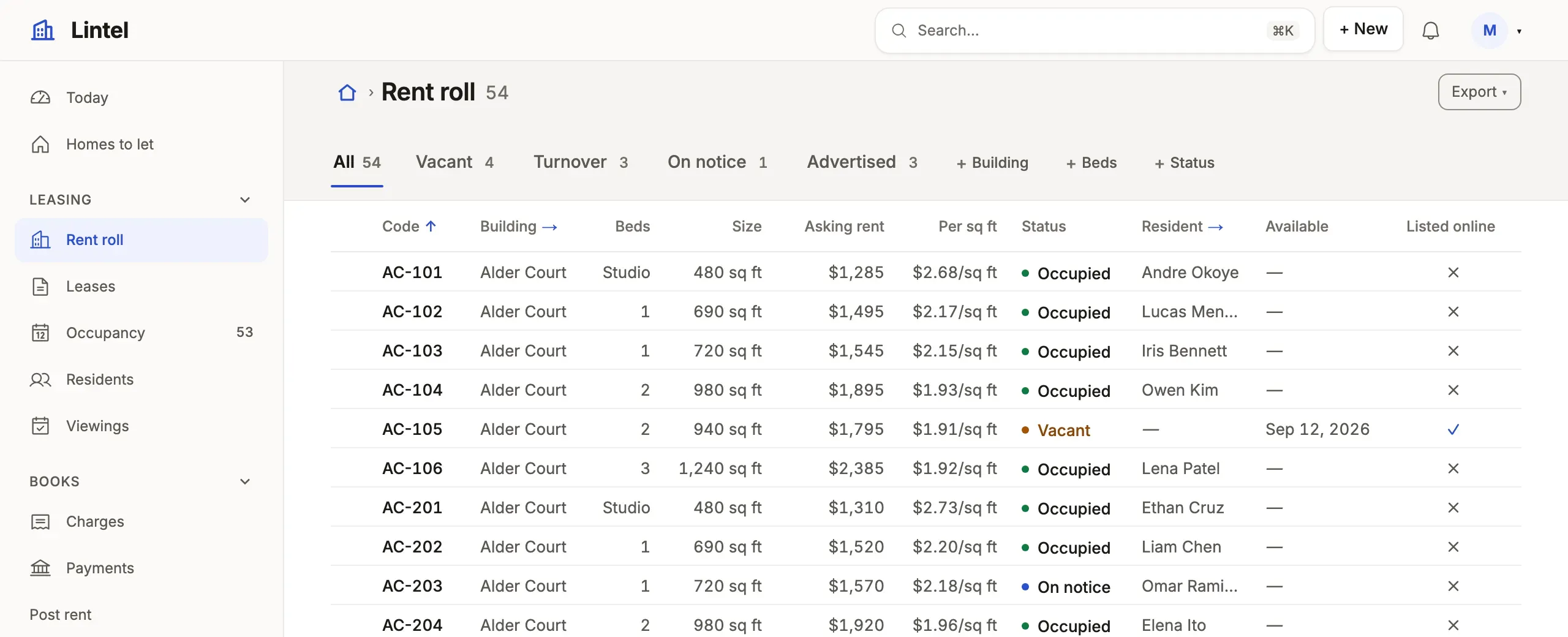
What you’ll see
Section titled “What you’ll see”noticesaid “On notice” andturnoversaid “Turnover”, in a tone, in grid cells, record fields, cards, group headings, board lanes, a machine’s stepper and the filter’s choices.market_rentas$1,825.00because its rule says money in whole cents (a number named like money is money without one), and a figure with aunitbeside it, asrent_per_sqftsays/sq ft.- Filters, sorts, exports and writes still use the stored value (
status = notice), andtoneandiconsstay keyed by it.
When to use it, and when not
Section titled “When to use it, and when not”- Use a display rule for how a value reads, once per column on the resource; every view, page and form follows it.
- Use
labelson the resource instead to rename a column’s caption, andrecordLabelto say what names a record (resources and fields). - Use
hiddeninstead ofmaskedto keep a value from reaching the browser at all (secrets);maskedonly draws••••••.
Options
Section titled “Options”| Key | What it does | Default | Status |
|---|---|---|---|
tone |
Value → good, warn, bad, info, neutral; numbers take thresholds ('>= 3'); '*' for the rest; a yes/no column is keyed true and false |
unnamed values are neutral |
Stable |
values |
Value → its word (≤80 characters); unnamed values are still said as words | in_review reads “In review” where the column is a vocabulary |
Stable |
icons |
Value → an App icon before the word; not on a figure | none | Stable |
format, unit, currency |
money, percent, number, relative, duration, email, phone, url; unit: 'min', said in the singular for one (unit: 'bikes' reads “1 bike”); money always in the currency’s decimals |
as stored | Stable |
minor, currency: { column } |
Money kept in cents, said in the currency’s decimals; each row’s own currency (money) | major units; the App’s currency | Stable |
bar, avatar, subtitle |
A bar beside a number, an initials disc, a second line from another column | off | Stable |
colors, icon, format: 'avatars' |
Value → one of the eight chart colors (a category’s pill, a board card’s tag); a lead mark in a small square toned by another column ({ mark: 'lightning', tone: 'status' }); a comma-separated list of names as overlapping initials |
off | Stable |
format: 'rating', outOf |
Stars, said as “4 of 5 stars”, 3 to 10 of them; a tone colors the filled ones; edited as stars |
5 stars | Stable |
format: 'color', 'time', 'month', 'year' |
A swatch beside a hex code; a clock time (14:30 reads “2:30 PM”); a month (2027-03 reads “Mar 2027”); a year without a thousands separator. Each is edited in the browser’s own picker |
as stored | Stable |
format: 'json', 'qr' |
A JSON document as a tree on its record, an excerpt in a list, edited in a monospaced box that says where it stops being JSON (the server refuses one that is not); a value as a QR code to scan, its text under it (near-black on white in every look, so it scans) | as stored | Stable |
scan, signature |
upc: { scan: true } adds a Scan button that reads a barcode or QR code from the camera where the browser can; signature_id: { signature: true } on a reference to a file resource is a pad to draw or type a signature, kept as a PNG there and drawn as the picture |
off | Stable |
ring, slider |
ring: true on a percent draws a small progress circle; slider: { min, max, step } edits a number along its range |
off | Stable |
masked |
true draws ••••••; { prefix: 'ENC:' } only for values with that prefix |
off | Stable |
format: 'richText' |
Formatted text: whole on its record, an excerpt in a list, edited with a toolbar and Markdown shortcuts; images: 'attachment' keeps a pasted picture as an attachment of the record, mentions: { from: 'member', by: 'id', labelColumn: 'name' } offers people after an @, and groups: { from: 'team', by: 'id', labelColumn: 'name', through: 'team_member' } teams too; a notify rule’s mentions: { in: '<column>' } tells them, a team as its members |
off | Stable |
Where a column’s vocabulary comes from: the database’s own list (a PostgreSQL enum or CHECK (status IN (…)), a SQLite CHECK … IN (…), a MySQL enum(…)). It feeds filter choices, board lanes and form pickers, sorts in the declared order (new, qualified, won), and appears in tablewalk-schema.d.ts under Columns, so a typed query string such as 'stage = won' fails as you write it when won is not one of them. An UPPER_SNAKE code without values or a tone stays as stored. Every key: resources reference.
Rich text is stored as HTML the server cleans. Every write to a richText column, through a form, the API, MCP or a command, keeps only paragraphs, emphasis, headings, lists and checklists, links (http, https, mailto), quotes, code, tables and the App’s own attachment pictures; scripts, styles and handlers never reach the database. The API and agents may send Markdown (**done**, - [ ] call back) or { format: 'markdown' | 'html', text }; Markdown is read up to 20,000 characters (longer text is sent as HTML), and a value with more than 256 runs of *, _ or ~ keeps them as written. A column of plain text drawn as rich text reads as its words.
Common mistakes
Section titled “Common mistakes”[restated]onformat: 'number'beside aunit, or acurrencythat is the App’s own → delete it; the platform says it already.- A query that filters by the word (
stage = Won) matches nothing, or fails as you type → filter by the stored value,stage = closed_won. maskedused to protect a secret → the value still reaches the browser; usehidden.
Related
Section titled “Related”- Lists: where most rules are seen, and the board lanes they name.
- Dates and types: which columns are numbers or dates to format.
- Looks: the colors each tone wears.
- Custom components: a value renderer when a rule is not enough.