Relationships
Follow foreign keys from a record to what it points at and what points at it, and declare the keys a database leaves out.
header({ facts: ['email', 'phone', 'language'] }), fields(['balance', 'open_requests', 'since']), related('Leases', 'lease', 'resident_id', { show: ['unit_id', 'start_on', 'end_on', 'rent', 'status'], sort: 'start_on desc' }), related('Repairs', 'maintenance_request', 'resident_id', { show: ['title', 'status', 'reported_on'], sort: 'reported_on desc', limit: 8, }),See it in the sample (examples/apps/lintel/pages/resident.ts:8); Sample Apps says how to run Lintel.
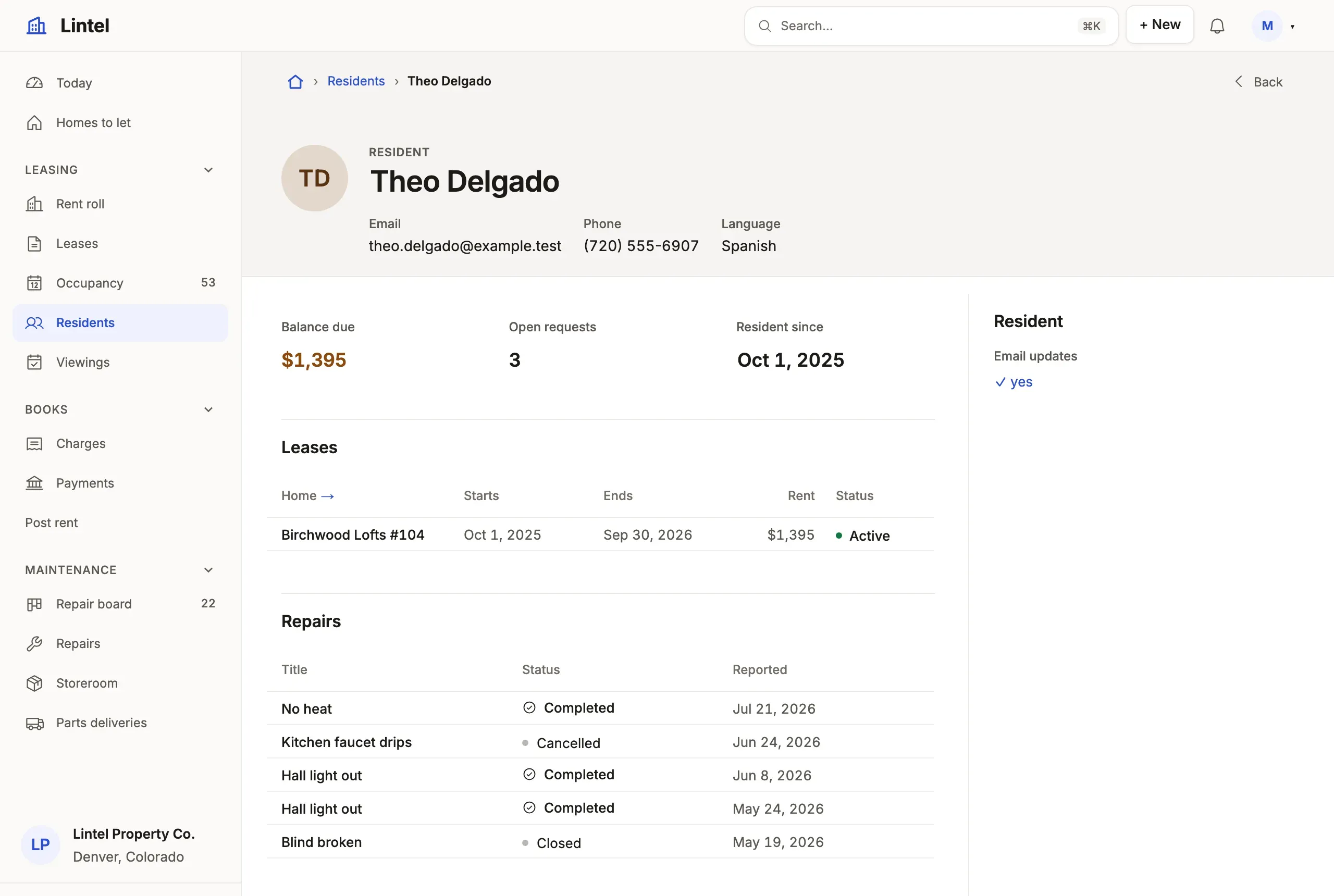
What you’ll see
Section titled “What you’ll see”- A foreign key column (
unit_id,resident_id) drawn as its record’s name, linked to that record, never as a number. - A related list per table that points back (
resident_idonleaseand onmaintenance_request), and a self-reference (aparent_account_id) as its own list of children. - Label paths such as
owner_id.namein a list’sshow, a card or arecordLabel, read in the same statement.
When to use it, and when not
Section titled “When to use it, and when not”- Use a hop (the foreign key, written as its column) wherever one table reaches another:
related,whoseon a metric, chart or rollup,abouton a section about another record,stream(from, whose, at, show)on a timeline.tablewalk-schema.d.tslists every table’s hops underReferences. - Use
referenceson the resource when the database holds the link as plain text (site_codenamingsite.code); declare a real foreign key instead when you own the schema. - Use
related(title, from, { same: [column] })instead to list rows that share a value with the record (the same category) rather than point at it; it needs no key.
Options
Section titled “Options”| Where | Written | Example |
|---|---|---|
| Related list | related(title, table, hop, { show, query, sort, create }) |
related('Contacts', 'contact', 'account_id', …) |
| Label path | hop.column, as deep as the keys go |
opportunity_id.account_id.city |
| Figures about the record | whose: hop on metric, chart, breakdown |
{ whose: 'account_id' } |
| Rollup | count, sum, min, max over the rows that point here |
count('task', { query: 'status = open' }) |
| Declared key | references: { col: { to, column? } } on the resource |
{ site_code: { to: 'site', column: 'code' } } |
A composite key is a+b, and the constraint’s name where two keys share columns. Where its other columns are NOT NULL and its target column is unique alone, as in a tenant’s (tenant_id, incident_id) REFERENCES incident (tenant_id, id), its remaining column is a reference too: incident_id.number is a path, and incident_id draws the ticket. A declared reference’s target must be unique (its primary key, the default, or a unique constraint on that column alone) and of the same kind; it is followed like a key, but is never authority for a write and adds no delete impact. Every key: resources reference.
Across sources: two sources on one connection are one database, so a key between them joins. A reference into a source on another connection is read in two steps (the rows, then one read of the targets through that source’s grants): it labels, links and gives the target a related list, while a filter, sort, grouping, rollup, tags or notify path through it is refused. A tenant App’s references stay within its one source.
Common mistakes
Section titled “Common mistakes”has no reference called "site_code"or[not-a-reference]→ the column is not a foreign key; add one (ALTER TABLE work_order ADD FOREIGN KEY (site_code) REFERENCES site (code)) or areferencesentry, then runtablewalk check.[unknown-column]on a label path (owner_id.nmae) → each step is checked against the table it lands on; the message names the nearest column there.- A filter or sort through a reference to another connection is refused → move both tables to one connection, or filter on the near side.
Related
Section titled “Related”- Record pages: where related lists, metrics and timelines sit.
- Resources and fields:
recordLabel, which names the record a key points at. - Query language: label paths in a tab’s query (
account_id.rating = hot). - Design a record page: which related lists earn a tab.
- Stock that can’t be oversold: a line that takes from the record it points at.