Blocks gallery
Every dashboard block, list presentation and value display in Lumen, each with the declaration that asks for it.
Each picture is taken by scripts/docs-shots.mjs from a sample App; the snippet is that App’s own source, shortened. Column and table names are the sample’s. Dashboard blocks go in a dashboard’s sections, presentations in a list, and display rules under a resource’s display.
Dashboard blocks
Section titled “Dashboard blocks”Metric cards
Section titled “Metric cards”A figure with its change against the previous period and a spark of its trend.
metric('Won', 'opportunity', { query: 'stage = closed_won and close_date = last 90 days', measure: 'sum amount as won', compare: 'previous period', better: 'up', over: 'close_date', spark: true,})
Line chart
Section titled “Line chart”A trend by month; curve: 'smooth' never overshoots a month’s count, and two keys draw a line per source.
chart('New leads by source', 'lead', 'month created_on, source', { query: 'created_on = last 12 months', curve: 'smooth',})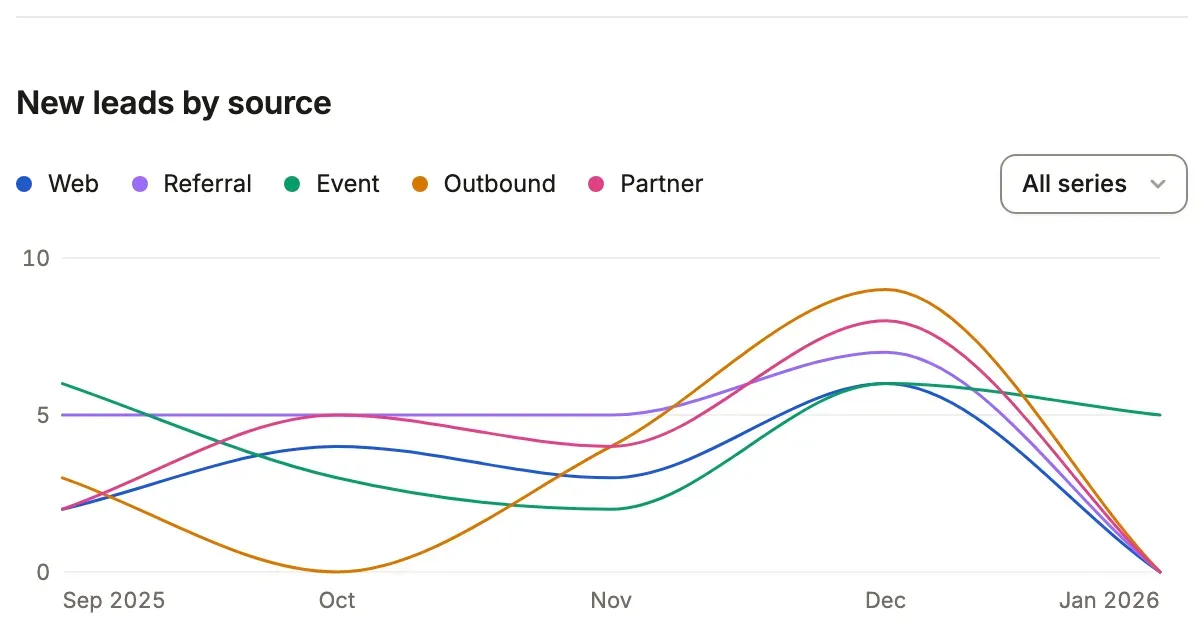
A breakdown, a chart and a matrix take a metric’s format and unit: measure: 'avg won * 100', format: 'percent'
says each bar as “86.4%”, and measure: 'avg first_response_seconds', format: 'duration' says a figure of seconds as
“10h 2m”.
Line chart, plain
Section titled “Line chart, plain”The default shape is a line over a month, with the area washed under it.
chart('Bookings by month', 'opportunity', 'month close_date', { query: 'stage = closed_won and close_date = last 12 months', measure: 'sum amount as won',})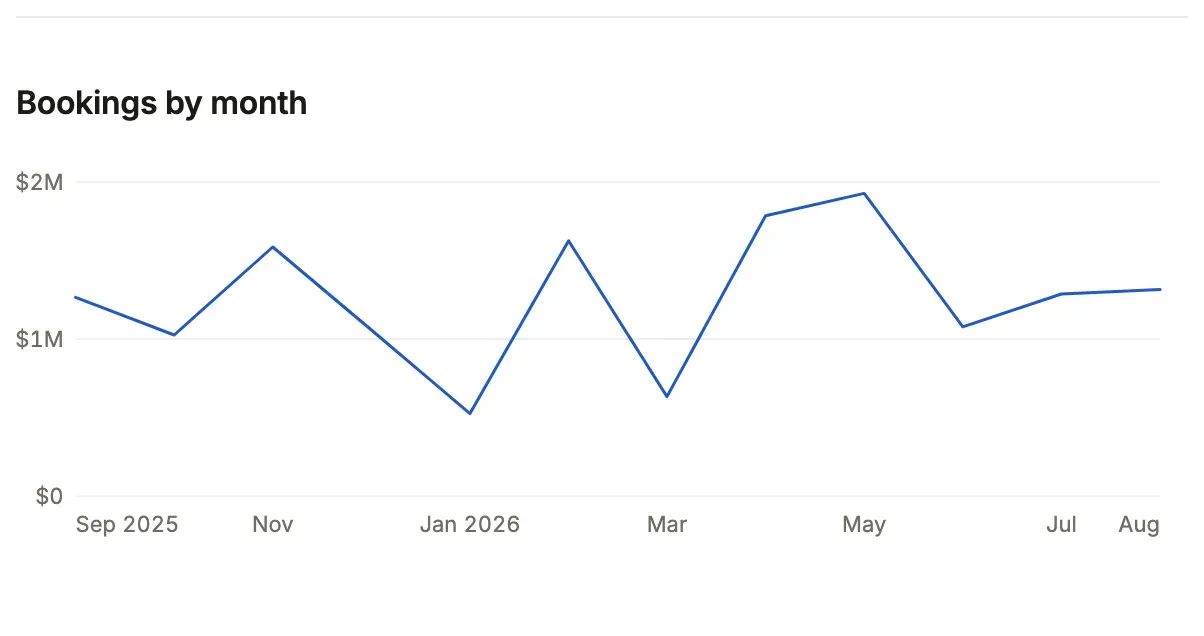
Bar chart
Section titled “Bar chart”shape: 'bar' draws each period as a bar.
chart('Lines moved by day', 'stock_movement', 'day moved_at', { query: 'moved_at = last 7 days and kind != "count"', shape: 'bar', over: 'moved_at',})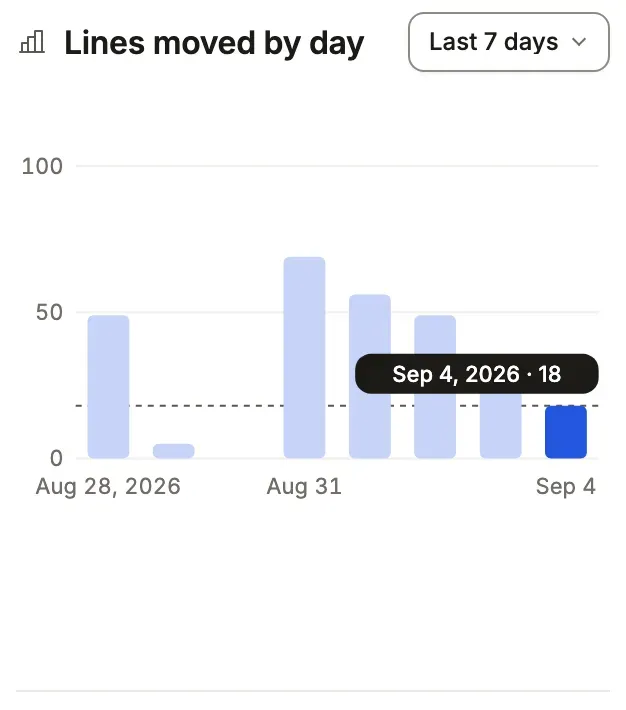
Donut with a total
Section titled “Donut with a total”A donut says each slice’s share and takes total for its middle.
chart('Leads by source', 'lead', 'source', { shape: 'donut', total: 'Leads', width: 'half',})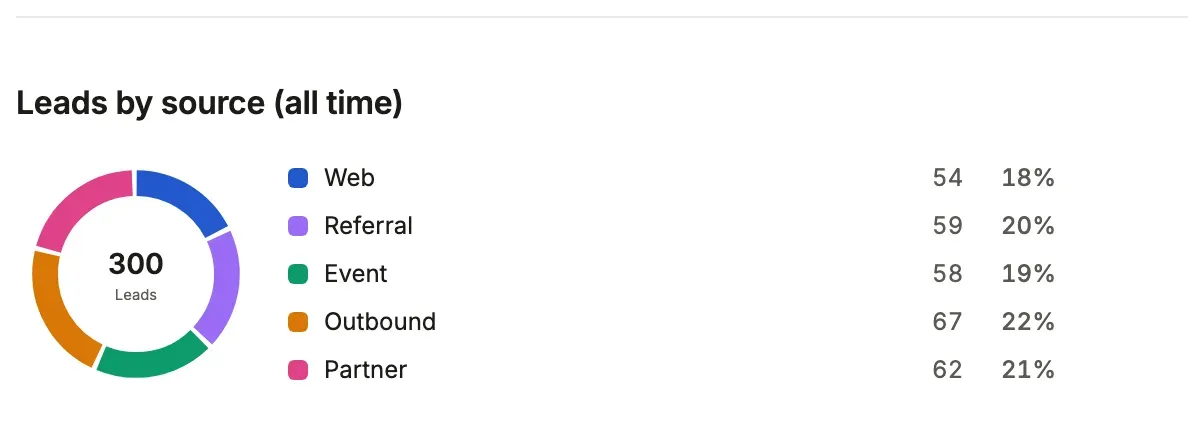
Funnel
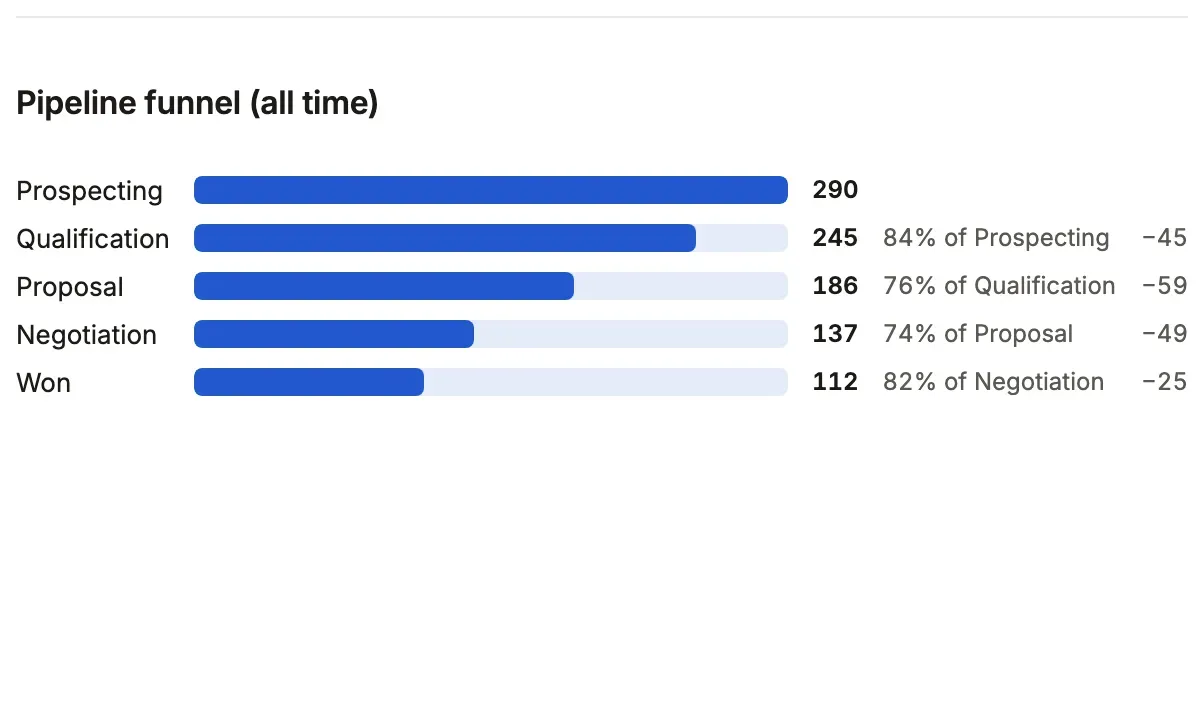
Section titled “Funnel”Stages a row passes in order, each counting the rows that reached it, as a bar against the first, a share of the stage before it and the rows it lost. A row reaches a stage when it holds the section’s query, every required stage before it and the stage’s own conditions. All stages are counted in one statement, so a later stage is never longer than the one before it. An optional stage is a side road: counted against the stage before it, and not required by the ones after, so a funnel whose stages are all optional is a checklist done in any order.
funnel('Pipeline funnel', 'opportunity', [ { label: 'Prospecting' }, { label: 'Qualification', query: 'stage in (qualification, proposal, negotiation, closed_won)' }, { label: 'Proposal', query: 'stage in (proposal, negotiation, closed_won)' }, { label: 'Won', query: 'stage = closed_won' },], { query: 'stage != closed_lost' })A stage opens the list narrowed to the rows that reached it, and the figure it lost opens the rows that stopped there (to names the list, as a chart’s does; to: false keeps them text). Where a stage’s conditions cannot be turned over exactly, the lost figure is text rather than a door that would open other rows. A funnel of 2 to 8 stages; this replaces the chart’s shape: 'funnel', which counted one column’s values.
Scatter
Section titled “Scatter”A dot per group, placed by two figures: x across, measure up.
chart('Reps: deals and value', 'opportunity', 'owner_id.name', { shape: 'scatter', x: 'count', measure: 'sum amount as value',})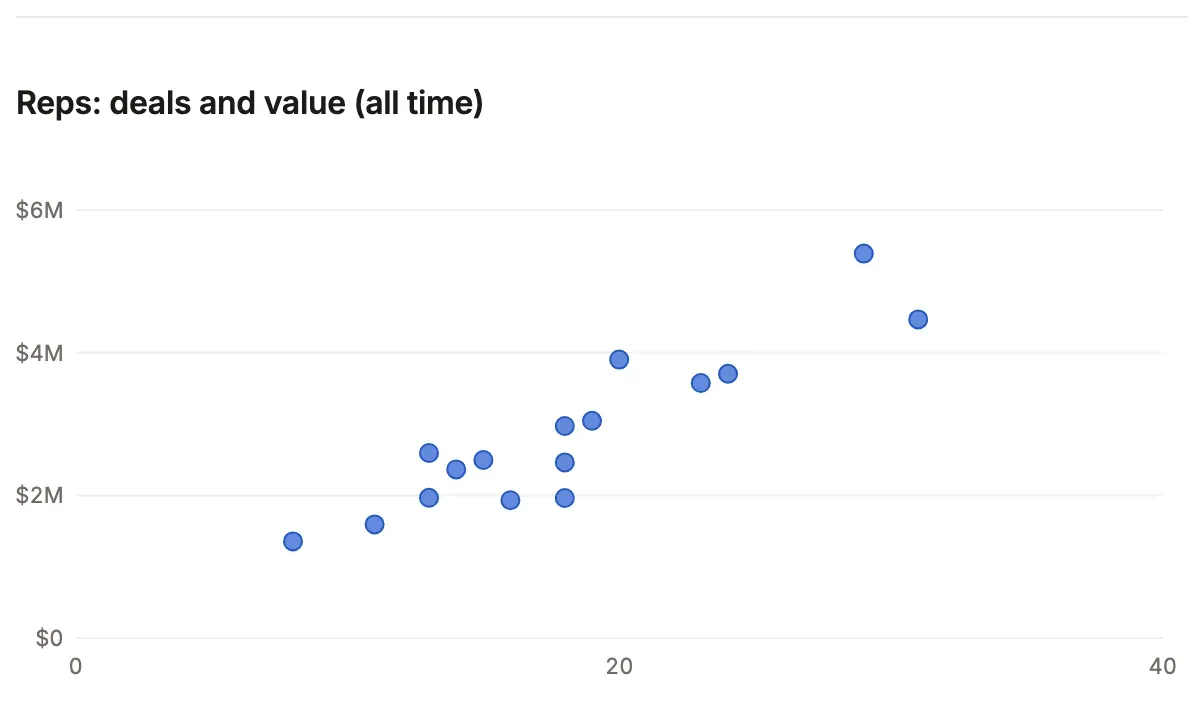
Heat map
Section titled “Heat map”Two keys as a grid of shaded cells; an hour with nothing keeps its column.
chart('Moves by weekday and hour', 'stock_movement', 'weekday moved_at, hour moved_at', { query: 'moved_at = last 90 days and kind != "count"', shape: 'heatmap',})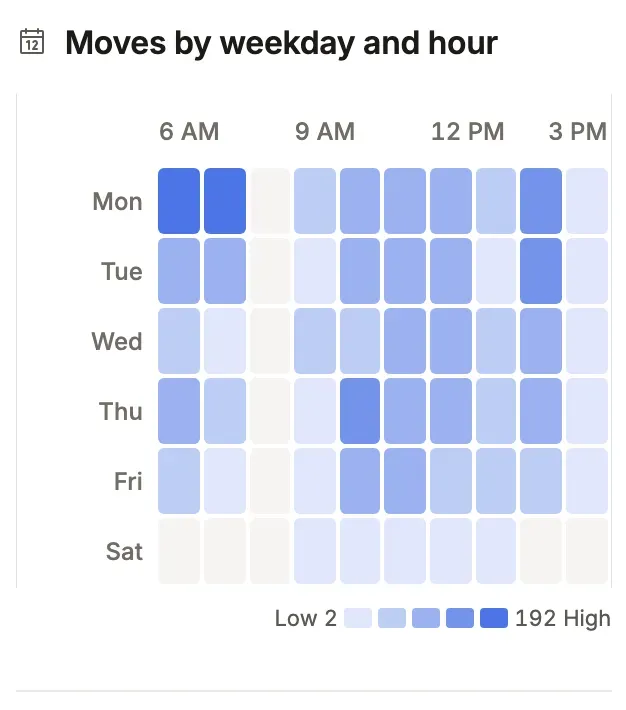
Waterfall
Section titled “Waterfall”Each period’s rise or fall from where the last ended, then the total.
chart('Net units by month', 'stock_movement', 'month moved_at', { query: 'moved_at = last 6 months', measure: 'sum qty', shape: 'waterfall',})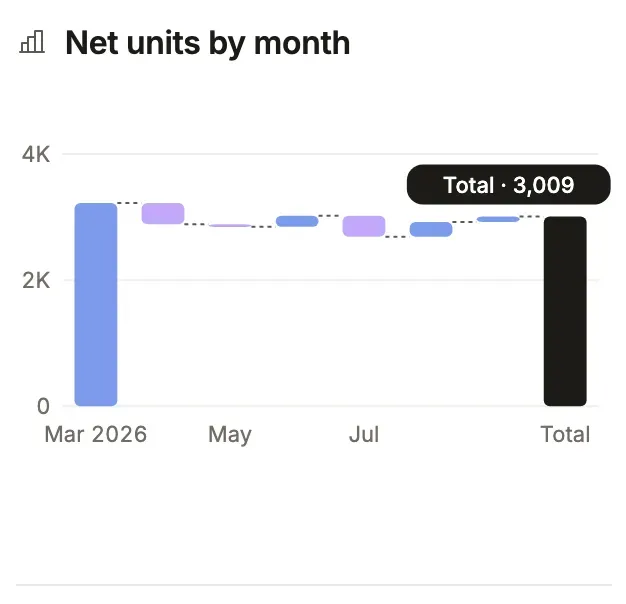
Treemap
Section titled “Treemap”Tiles in proportion to a measure; past eight, one “Others” tile.
chart('Stock value by category', 'stock_level', 'product_id.category_id.name', { measure: 'sum value', shape: 'treemap',})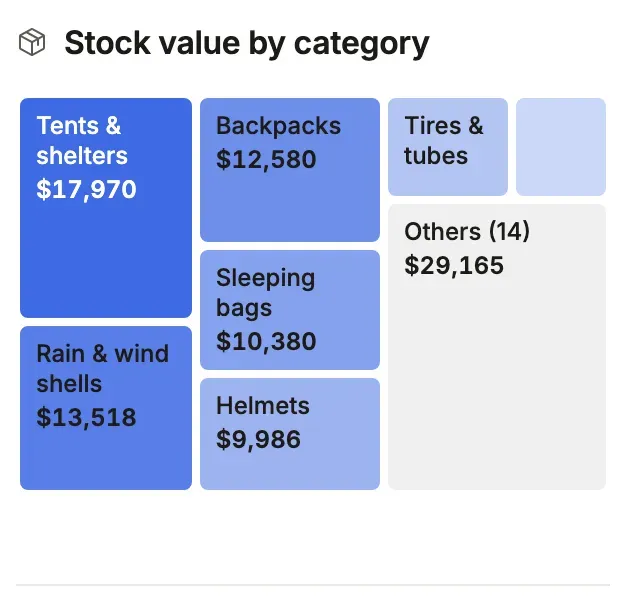
Breakdown
Section titled “Breakdown”Ranked bars by one key.
breakdown('Pipeline by stage', 'opportunity', 'stage', { query: 'stage != closed_won and stage != closed_lost', measure: 'sum amount as value', width: 'half',})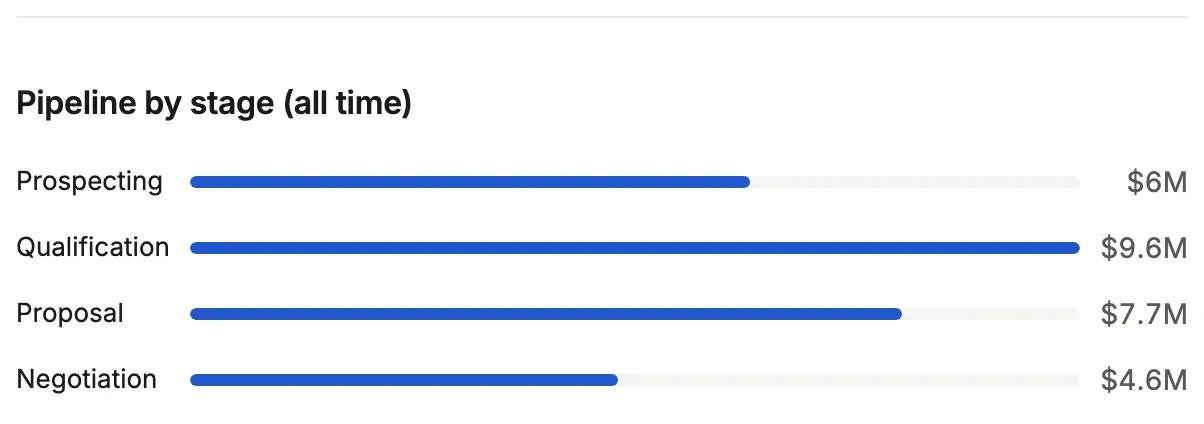
Breakdown as steps
Section titled “Breakdown as steps”shape: 'steps' draws a pipeline as a row of steps in the vocabulary’s order, each with its count and a short notes line.
breakdown('Pick lists by step', 'pick_list', 'status', { shape: 'steps', notes: { to_pick: 'Released, waiting on the floor', packed: 'Boxed for the carrier', },})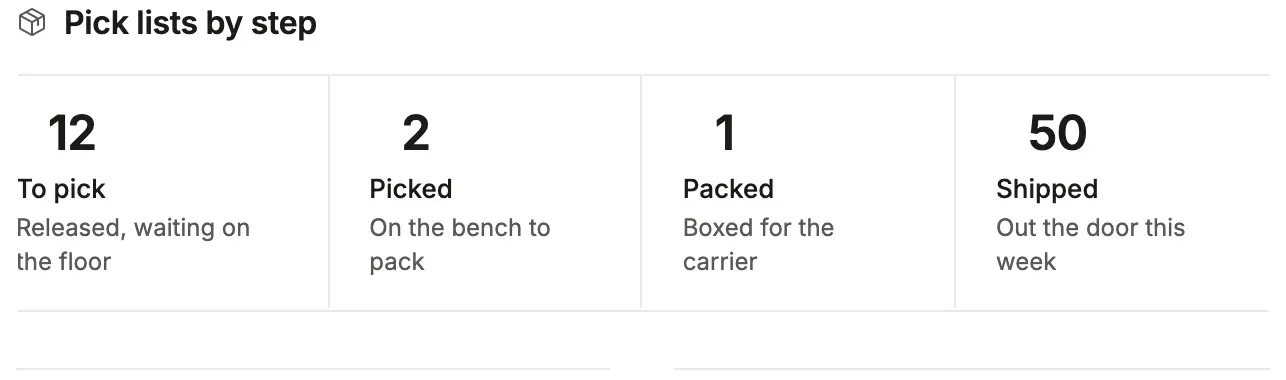
Note banner
Section titled “Note banner”A wide banner with an eyebrow, a title and one action.
note('Work the leads that came in this week before they cool.', { title: 'Pipeline review', variant: 'banner', eyebrow: 'This week', action: { label: 'Open leads', to: 'leads' },})
Window button
Section titled “Window button”windowControl: 'button' shows the window picker as one date-range button beside the filters.
dashboard('Sales dashboard', sections, { windowControl: 'button', windows: ['last 30 days', 'last 90 days', 'this year'],})
List presentations
Section titled “List presentations”List presentations: table
Section titled “List presentations: table”A list with no presentation is a grid: counted tabs, filters and a sort.
leads: listView('Leads', 'lead', { show: ['name', 'company', 'status', 'source', 'owner_id.name', 'created_on'], filters: ['status', 'source', 'created_on'], // `new` is a segment of the lead resource: segments: { new: 'status = new' }. tabs: ['new', { label: 'All' }],})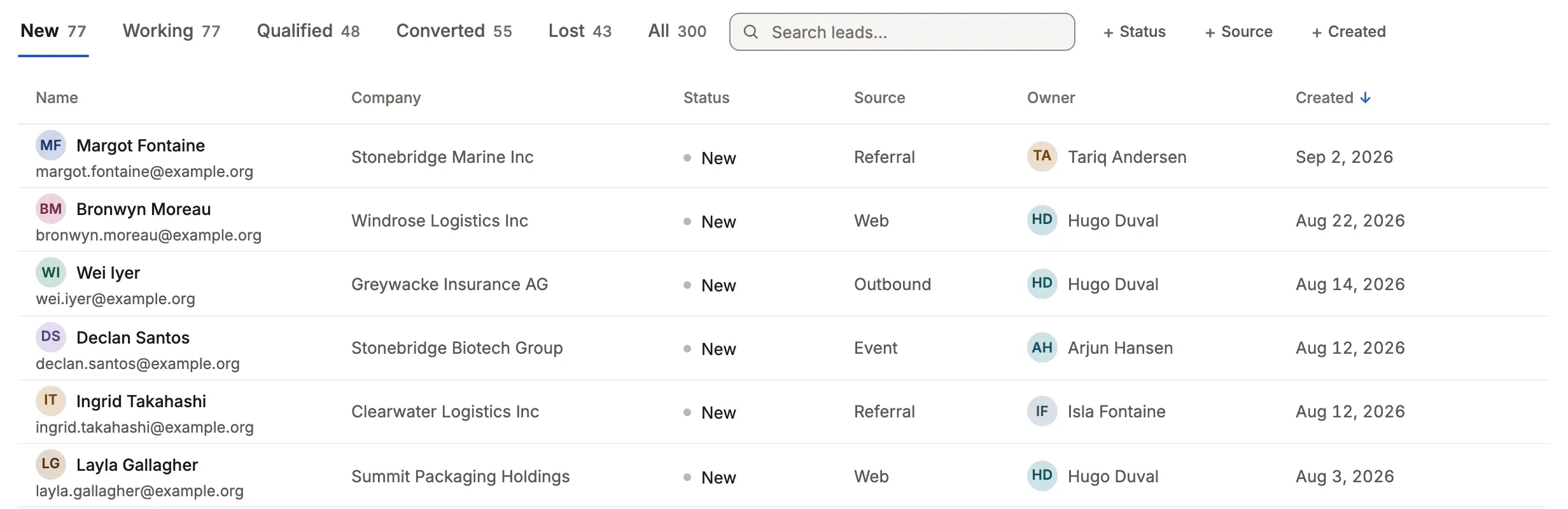
cards draws each record as a card, with a picture from a file resource.
presentation: cards('name', { value: 'list_price', facts: ['sku', 'category_id.name', 'on_hand'], image: { from: 'product_photo', whose: 'product_id', sort: 'position' },})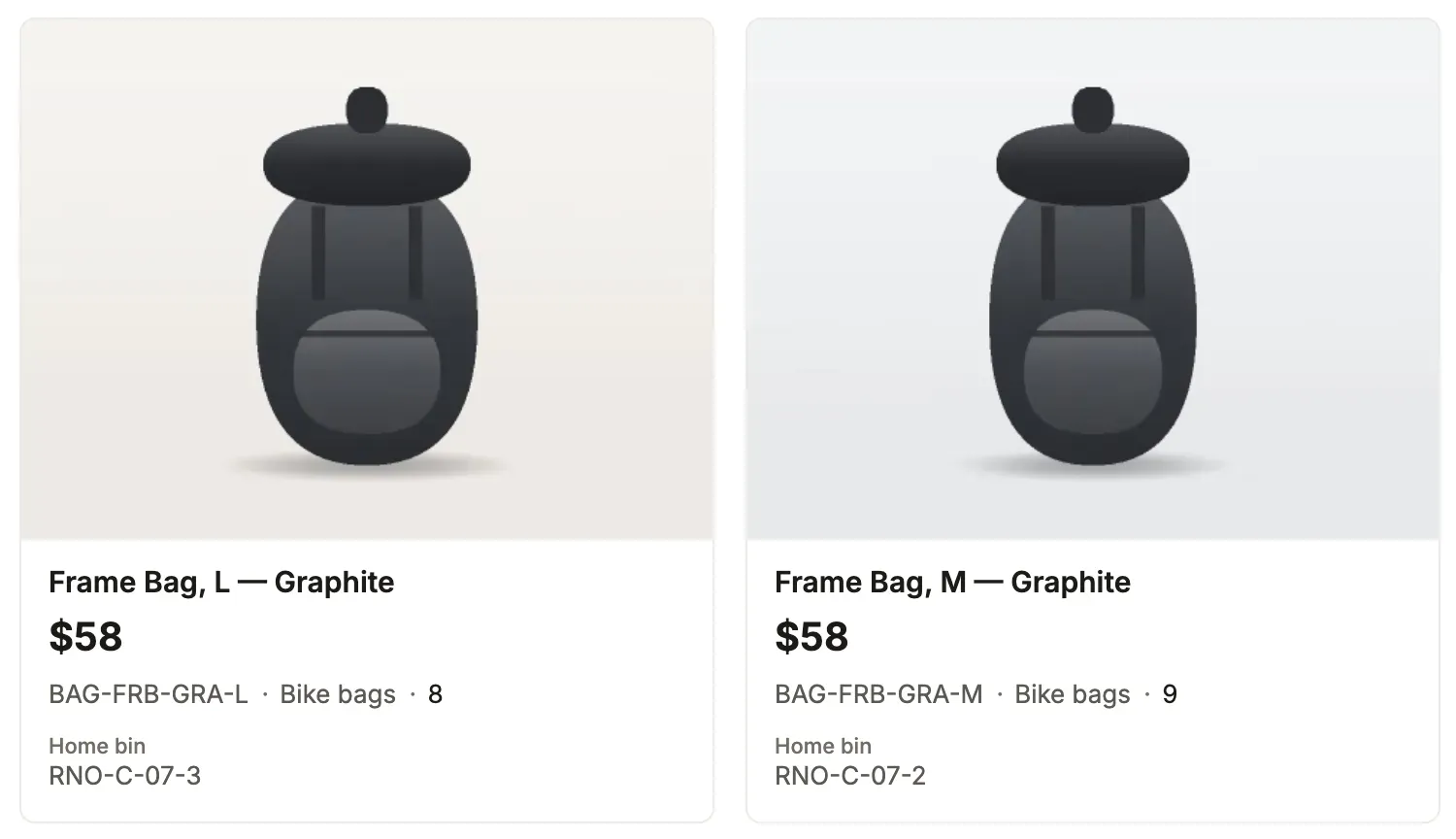
Without a picture, media: 'icon' leads each card with its icon column’s mark on a tinted tile, and footer says up
to four values along the card’s last line.
presentation: cards('name', { icon: 'kind', media: 'icon', description: 'summary', footer: ['price', 'turnaround'] })Lanes of cards by one column; a card takes up to four footer facts, each with an optional icon, and a category tag.
A line may be a rollup or a computed column. Where the column is a machine’s, a card moves through its verbs: to the
lane a verb leads to from the card’s state, or to any end of a verb whose command asks for the column.
board: { by: 'stage', primary: 'name', lines: ['amount'], footer: [{ column: 'close_date', icon: 'calendar' }, 'team'],}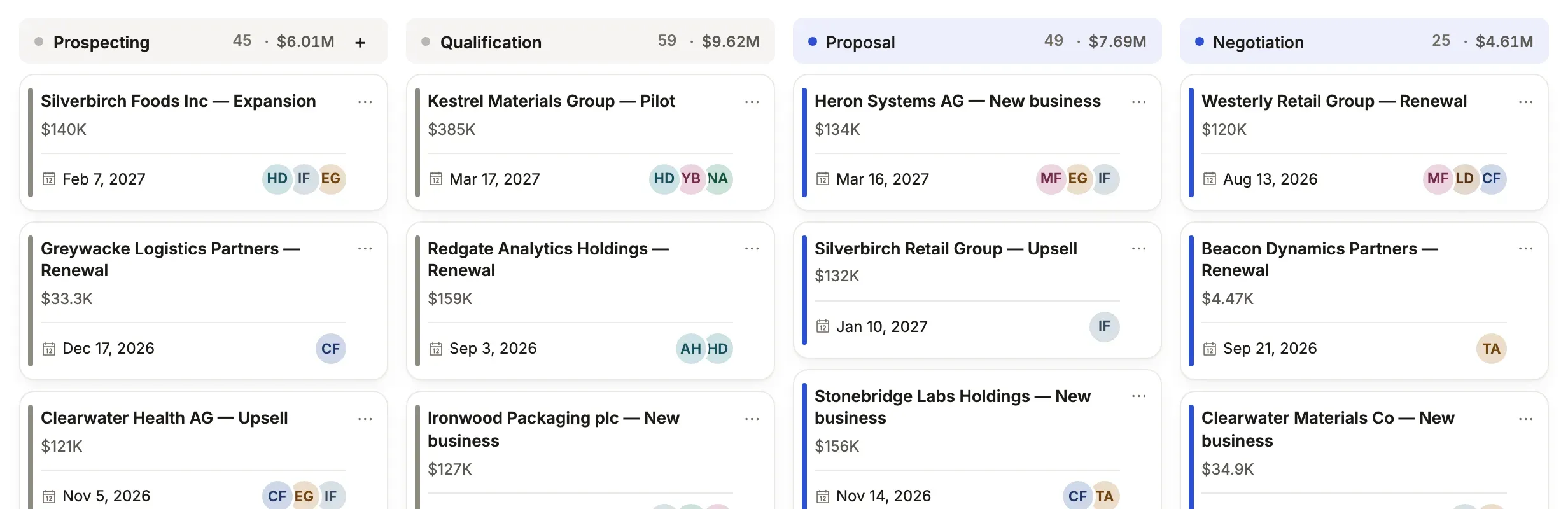
category: 'kind' adds a colored tag over the title in the color the column’s colors rule gives. No sample App on SQLite sets it, so that part has no picture.
Calendar
Section titled “Calendar”Records on their dates; the list’s tabs narrow what the month shows.
presentation: calendar('due_on', 'subject', {})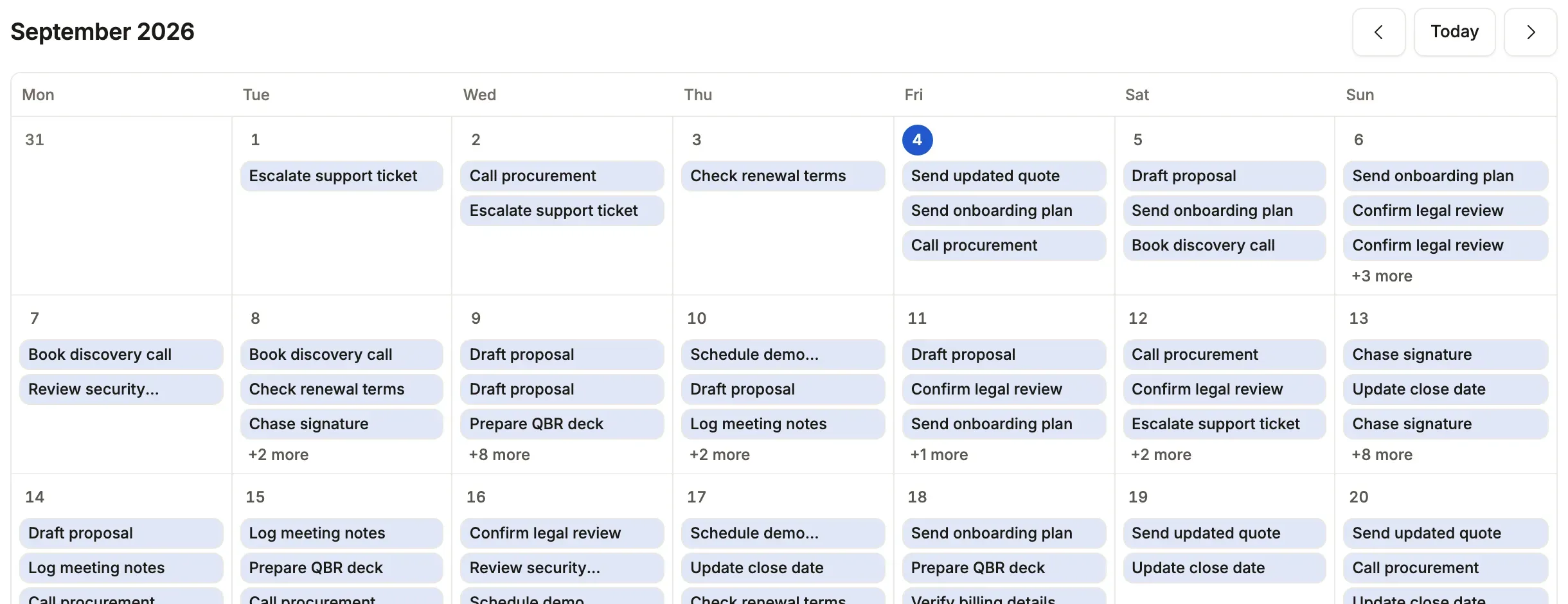
Each record folded under the one its self-reference names.
presentation: tree('parent_account_id', 'name', { lines: ['city'] })
Records as spans between two dates, a row per value of by, a line at today.
presentation: gantt('starts_on', 'ends_on', 'name', { by: 'kind' })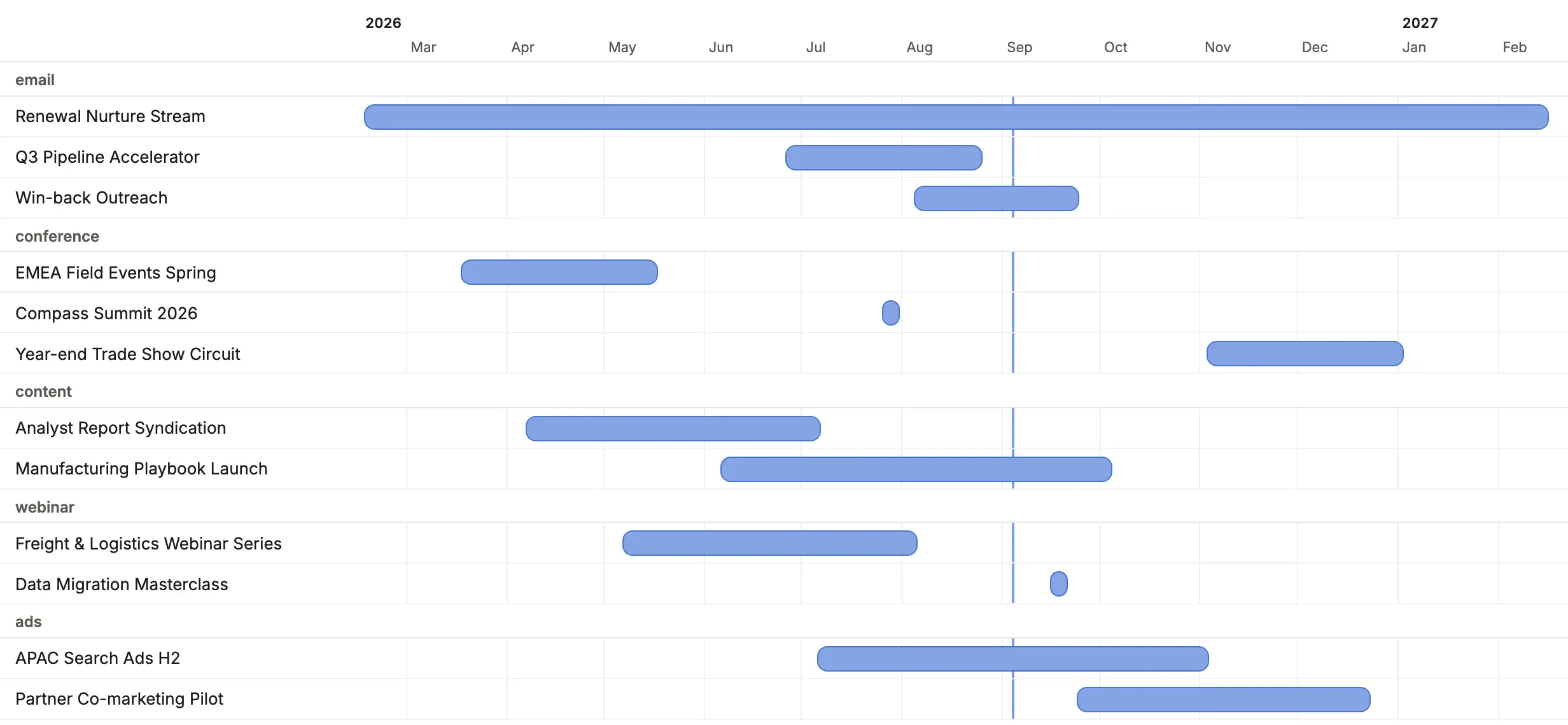
Checklist
Section titled “Checklist”Tick things off from the list.
presentation: checklist('name', 'completed', { lines: ['due_on'] })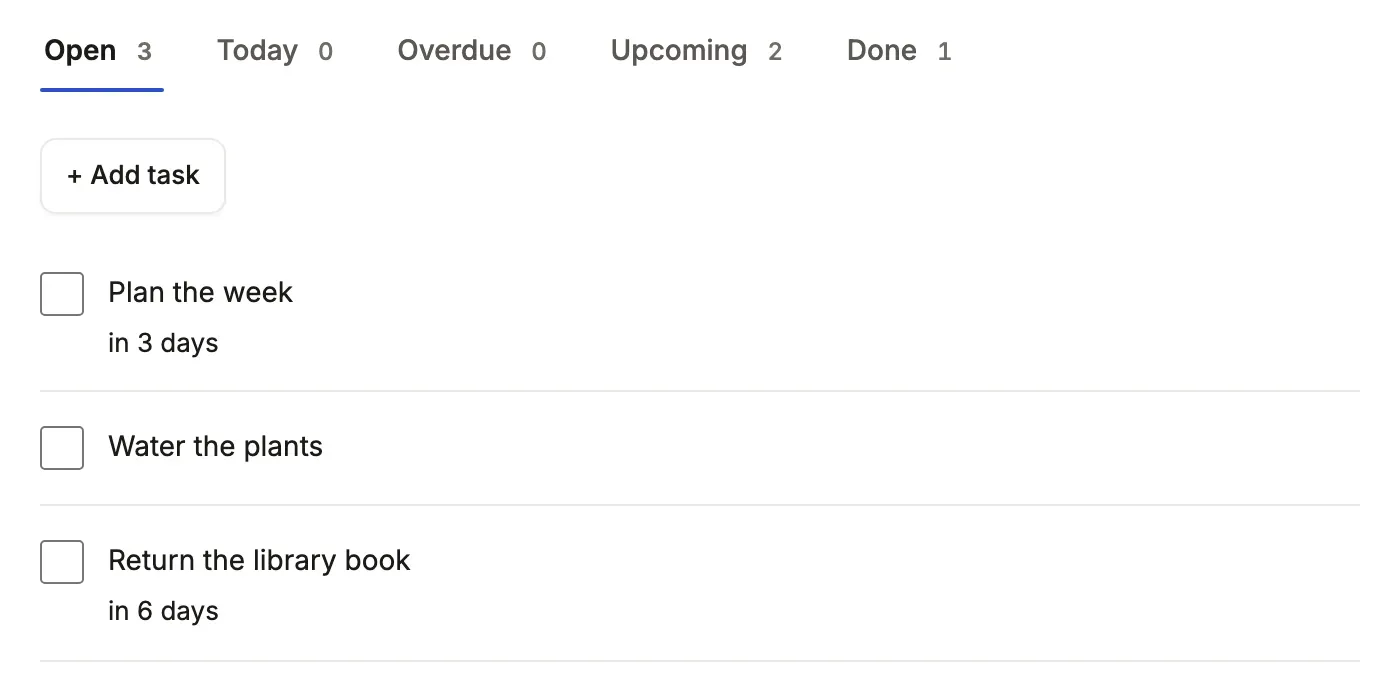
Value displays
Section titled “Value displays”Avatars
Section titled “Avatars”Overlapping initials for a list of names.
team: { format: 'avatars' }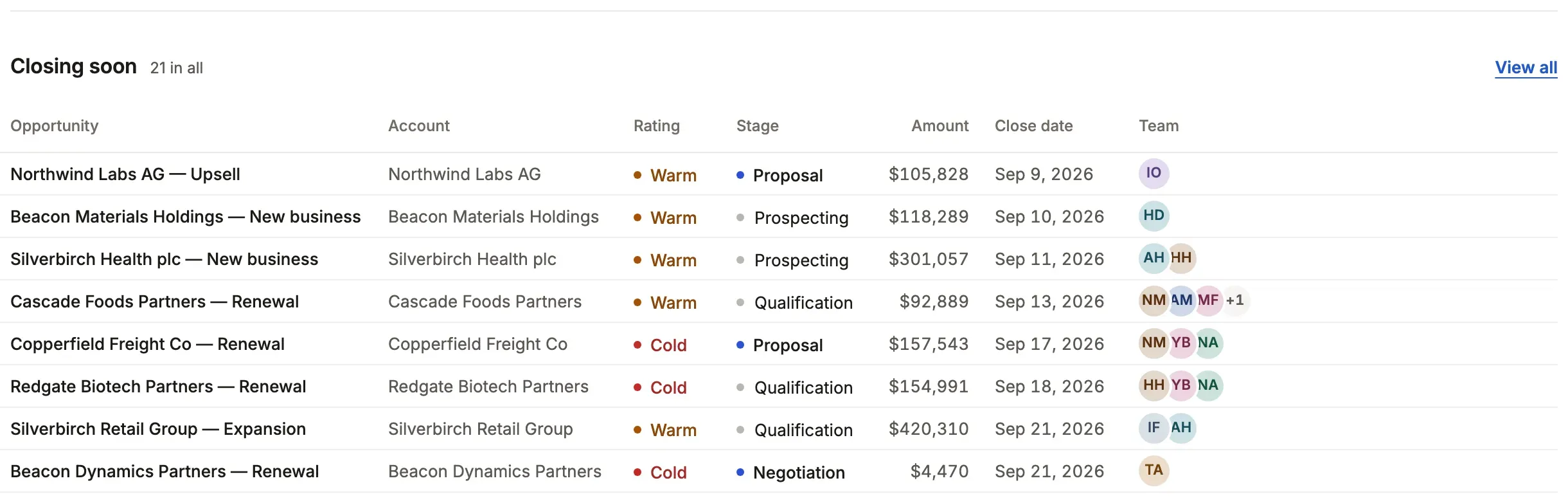
Icon mark
Section titled “Icon mark”A mark in a small toned square before the value.
name: { icon: { mark: 'tag', toneOf: 'status' } }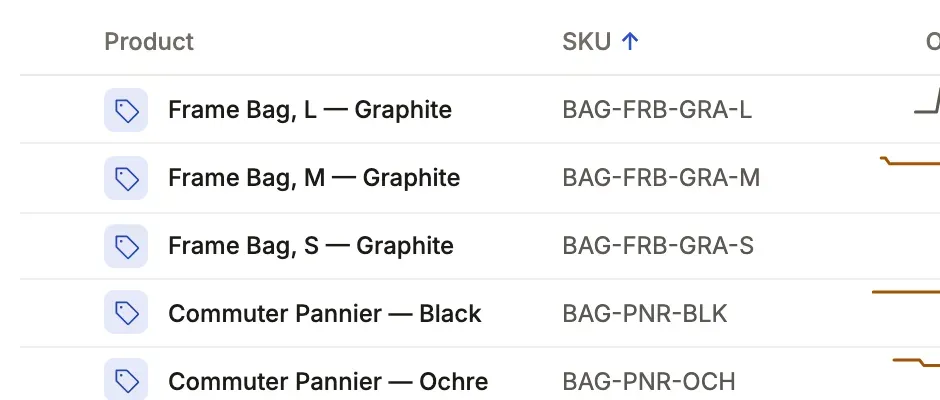
Rating
Section titled “Rating”Stars, edited as stars; outOf sets 3 to 10 (5 when unsaid).
health: { format: 'rating', tone: { '<= 2': 'bad' } }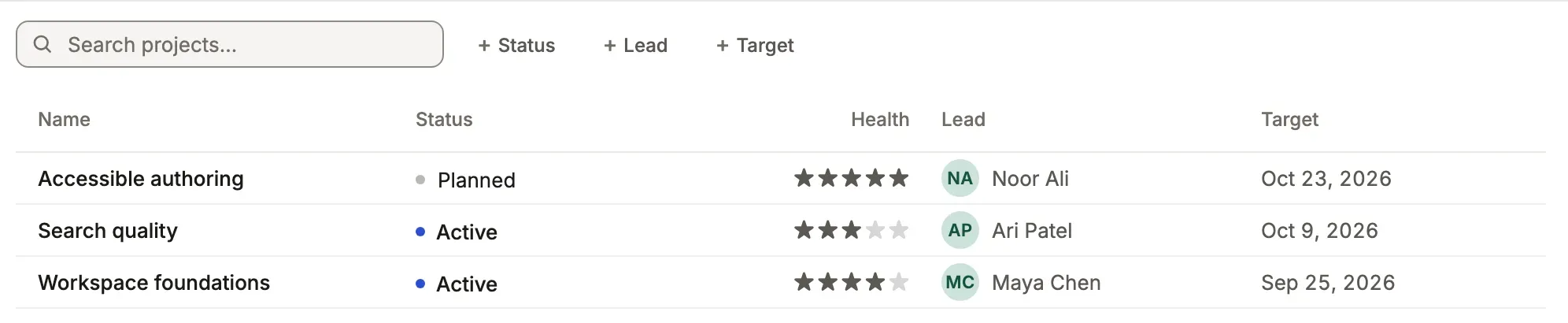
Slider
Section titled “Slider”A number edited along its range.
probability: { format: 'percent', bar: true, slider: { min: 0, max: 100, step: 5 } }Compass sets a deal’s probability this way. The slider appears only while the field is in edit, which a static address cannot show, so there is no picture.
ring: true on a percent draws a progress circle beside the figure.
progress: { format: 'percent', ring: true }No sample App that runs on SQLite draws this one, so there is no picture; Ignition (PostgreSQL) uses it.
A swatch, edited in the color picker.
brand_color: { format: 'color' }No sample App that runs on SQLite draws this one, so there is no picture; Ignition (PostgreSQL) uses it.
Time, month and year
Section titled “Time, month and year”Each value drawn its own way and edited in the browser’s own picker.
opens_at: { format: 'time' },renews_in: { format: 'month' },founded: { format: 'year' }No sample App that runs on SQLite draws this one, so there is no picture; Ignition (PostgreSQL) uses it.
A tree on the record, an excerpt in a list, and a monospaced editor that says where the text stops being JSON.
specs: { format: 'json' }No sample App that runs on SQLite draws this one, so there is no picture; Ignition (PostgreSQL) uses it.
A code to scan, with its text under it.
pass_code: { format: 'qr' }No sample App that runs on SQLite draws this one, so there is no picture; Ignition (PostgreSQL) uses it.
A Scan button reads a barcode or QR code from the camera where the browser can; the box stays for a scanner gun or the keyboard.
upc: { scan: true }Depot reads a product’s UPC this way. The Scan button sits in the edit form, which a static address cannot show, so there is no picture.
Signature
Section titled “Signature”A pad to draw or type a signature, kept as a PNG in a file resource and drawn as the picture wherever the value is shown.
signature_id: { signature: true }Depot takes proof of delivery on a pick list this way. The pad is in the edit form, so there is no picture.
Related
Section titled “Related”- Dashboards: the sections and the window.
- Lists: presentations, tabs and filters.
- Display rules: what a column says and how it is edited.
- Component library: every block in every look.