Public pages
Greet signed-out visitors with a front page, and, where you allow it, let them read chosen records without an account.
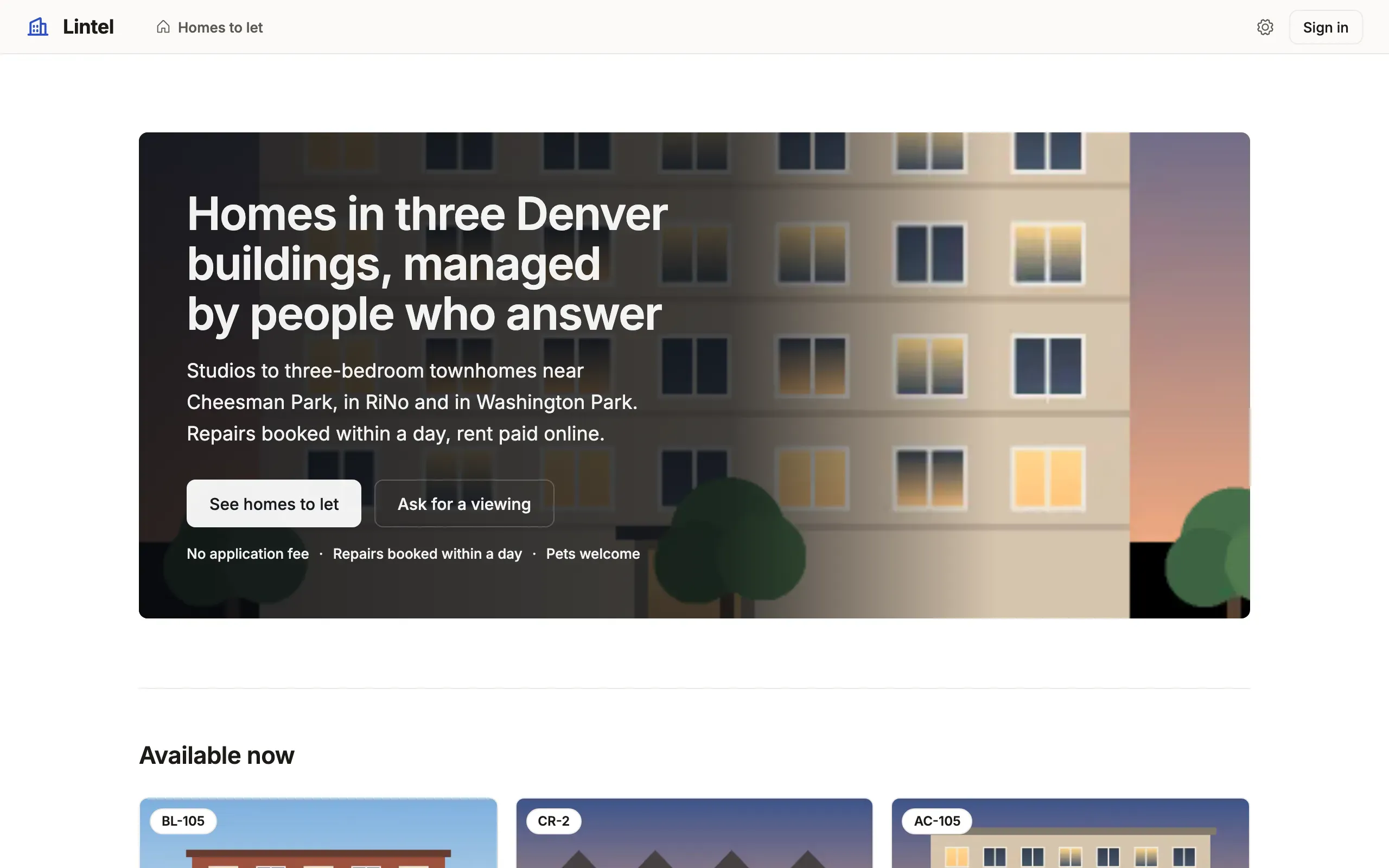
export const lintelLanding = landing( hero( 'Homes in three Denver buildings, managed by people who answer', // … [{ label: 'See homes to let', to: 'listings' }, applyTo('request-viewing', 'Ask for a viewing', 'secondary')], { // … highlights: ['No application fee', 'Repairs booked within a day', 'Pets welcome'], }, ), [ embed('listings', { title: 'Available now', limit: 6, sort: 'available_on' }), // … ], { label: 'Lintel: homes to let in Denver' },See it in the sample (examples/apps/lintel/landing.ts:6) (abridged: the full page adds questions and a closing call to action). Lintel declares it as welcome: lintelLanding in views, and opens it for signed-out visitors with home: [{ view: 'welcome', signedOut: true }, …].
What you’ll see
Section titled “What you’ll see”- At
/, signed out, the landing in the App’s own look under a top bar, the brand, the public entries and Sign in, in place of the staff sidebar; signed in,/is the App’s home, and/welcomepreviews the landing. - The hero’s photo, a row of a public file resource, beside the words (
layout: 'split'; Lintel’s hero sets its words over the photo withlayout: 'overlay'), and lists of public records as cards below it. - With
slug: trueon a resource, a public record’s address carries its name (/vehicles/1-2024-toyota-corolla-le), with a real<title>and a canonical link.
When to use it, and when not
Section titled “When to use it, and when not”- Use a landing when an App that signs people in has visitors who should learn what it is first; an App has at most one, and it needs
auth. - Use
auth.publicwhen visitors should read real records (a catalog, a forum); without it a landing reads no data at all, only what the App’s definition says. - Use a public command form instead when visitors only send something (an application, a report), and nothing is read back.
Options
Section titled “Options”| Helper or key | What it does | Status |
|---|---|---|
hero(heading, text?, actions, { image, layout, search, highlights }) |
The one heading; one to three actions: { label, to }, signIn(label), applyTo(form, label) |
Stable |
features, steps, faq, text, contact |
Points, numbered steps, questions, prose, links; up to twelve sections in all | Stable |
callToAction(title, text?, actions) |
A closing prompt with one to three actions | Stable |
embed(view, { limit, sort }), search(view, filters) |
Records of a cards list; a search over a list’s filters (both need auth.public); a filter the list suggests suggests here too |
Stable |
auth.public |
{ read: [...], fields }: resources a signed-out visitor reads, read-only |
Stable |
a resource’s slug: true |
A public record’s address carries its name; any other spelling answers 301 | Stable |
Everything on a landing is plain text, never HTML or Markdown, with length limits checked at load; a link is https://, mailto: or tel:. The footer is the App’s ui.footer. Every key: views reference, auth reference.
Common mistakes
Section titled “Common mistakes”- “A landing view requires
auth” → addauthwith a provider; an App without sign-in has no signed-out visitor to greet. - An
embedorsearchrefused withoutauth.public→ name the list’s tables inauth.public.read, within the roles’ own read. [authority-lock]after addingauth.public→ the grant is part ofauthority.lock; review it, thentablewalk check --app . --write-authorityand commit the lock.- A link to
http://orjavascript:refused → usehttps://,mailto:ortel:.
Related
Section titled “Related”- Sign-in: providers, sign-up and the sign-in screen the landing’s action opens.
- Command forms: the public form an
applyToaction opens. - Navigation and the shell:
homerules and the footer. - Lintel: the property sample, signed out and signed in.