Sign-in
Make people sign in before they reach an App, with passwords, GitHub, Google or your identity provider, and manage their accounts in the App.
auth: { // … providers: ['email'], // … roles: { leasing, manager, // … admin: { label: 'Admin', extends: 'manager', operations: ['workflows'] },See it in the sample (examples/apps/lintel/app.ts:54): the admin role is the account a first start bootstraps (TABLEWALK_AUTH_ADMIN_EMAIL).
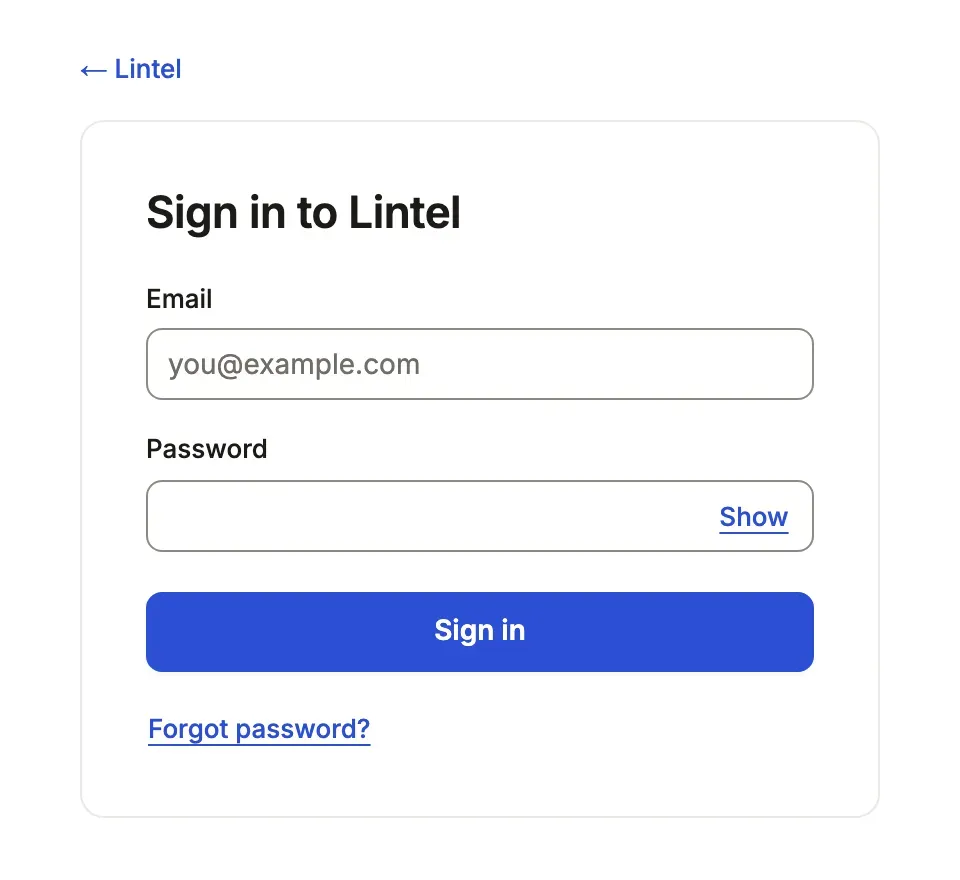
What you’ll see
Section titled “What you’ll see”- A sign-in card at every address of the App until a session exists; the server reads a signed-out visitor nothing but what
auth.publicnames. - An account menu in the bar: who is signed in, Your profile (where a person changes their name, password and, when the App sends email, their address: a link goes to the new address and a notice to the old one), preferences, dark mode and Sign out, which locks and clears the App at once.
- For an account holding
admin, Manage accounts in that menu.
When to use it, and when not
Section titled “When to use it, and when not”- Use
authwhenever the App is reached beyond your own machine: without it, every column of every declared resource goes to anyone who reaches the port. - Use roles beside it when people differ in what they read and write;
authwithoutrolessigns people in and gives them all the same access. - Use an identity provider instead of passwords when your organization already signs people in.
Options
Section titled “Options”| Key | What it does | Default | Status |
|---|---|---|---|
providers |
'email' (password), 'github', 'google', oidc('<name>'), saml('<name>') |
['email'] |
Stable |
signUp |
'invite' (an administrator adds accounts), 'open', or { providers, domains } |
'invite' |
Stable |
defaultRole |
The role a new account gets | 'user' |
Stable |
roles |
What each role reads, writes and runs (roles) | none: all alike | Stable |
public |
What a signed-out visitor reads (roles) | nothing | Stable |
me |
The table and email column that are the signed-in person ({ from: 'member', column: 'email' }); in a tenant App the column holds the account’s id, and me is the row in the tenant the person is working in |
none | Stable |
me.create |
{ name: 'full_name' }: the server makes a new account’s row on its first signed-in request (sign-up, invitation, first single sign-on), once; the email column must be unique |
none | Stable |
store |
Where accounts and sessions live: a SQLite file or a postgres:// URL, apart from the business data |
auth/<id>.db in the config directory |
Stable |
All keys: the generated reference. Changing auth needs a restart.
What the server needs
Section titled “What the server needs”BETTER_AUTH_SECRETin its environment, at least 32 characters; without it the App does not start.- The address people reach it at, when that is not loopback:
--allowed-host(build and deploy). - A first account:
TABLEWALK_AUTH_ADMIN_EMAILandTABLEWALK_AUTH_ADMIN_PASSWORDmake it, withadmin, at the first start; orsignUp: 'open'. Each example’s README shows its seed step. - For password resets and verified addresses, an email service. Without one,
TABLEWALK_AUTH_RESET=logwrites each reset link to the server’s log for an operator to pass on; set it only where the log is as private as the secret. - With
signUp: 'open', an email service too. Anyone may claim any address there, so an account someone makes for themselves is matched tome(and to the rows a row policy finds by its email) and given notifications only once its address is verified; until then it is signed in as nobody in particular. An account an administrator makes on the accounts screen is verified when it is made: the administrator named the address, and no link is sent for it.tablewalk checkfails on open sign-up with no email service (open-sign-up-unproven).
Managing accounts
Section titled “Managing accounts”An account holding admin adds accounts (name, email, roles and, with
passwords, a first password), sets roles, deactivates and reactivates them,
and sets a new password. Deactivating or a new password ends the account’s
other sessions. Each change is authorized from the verified session; an
administrator cannot remove their own admin or deactivate themself. admin
manages accounts; what it reads and writes in the App comes from the admin
entry in roles, as for any role.
Every change is recorded in the sign-in store in the same transaction, so a change that cannot be recorded is not made: who, when, the account, and the fields before and after, never a password or a token. History on the accounts screen reads it. A tenant App manages members through its own administration.
Settings records
Section titled “Settings records”A one-row resource such as a company profile opens from Settings in the
account menu, on its own page and under its own grants:
company: { access: 'write', settings: 'Company profile' }.
What a session protects
Section titled “What a session protects”- The shell sends a Content-Security-Policy: scripts from the server only,
connect-src 'self', no framing by other sites. - A signed-in reader’s pictures are
private, no-cachewithVary: Cookie, so a withdrawn grant or a sign-out takes effect at once. - History, the activity feed and notices name people, never their email.
- What a browser already fetched is not erased from it; there is no policy polling.
Common mistakes
Section titled “Common mistakes”"auth" needs BETTER_AUTH_SECRET in the environment→ set a random value of 32 characters or more, kept like a password.- Nobody can sign in to a new App → set
TABLEWALK_AUTH_ADMIN_EMAILandTABLEWALK_AUTH_ADMIN_PASSWORDfor the first start, or open sign-up. - A new account sees an empty App →
defaultRolenames a rolerolesdoes not declare (the default isuser); declare it or name one that is.[role-label]→ give each role alabel, the name people read on the accounts screen. - “Sign-in failed (500)” and nothing else → the server’s stderr has one line for it,
tablewalk: auth POST /api/auth/sign-in/email answered 500 for App "<id>": <error>: the route, the error’s name and message, never the email, password, token or cookie. A wrong password is a 401 and is not logged.
Related
Section titled “Related”- Roles and field access: what each signed-in person reads, writes and runs.
- Sign in with your identity provider: OpenID Connect or SAML, roles from claims.
- Email: resets and verified addresses.
- Tenant Apps: one App, several organizations, members per tenant.