Forms
Curate the New form and record editing of a table, which fields in which groups, their defaults and help, and when Save happens.
form: { defaults: { completed: false }, groups: [ { label: 'What', fields: ['name', 'completed'] }, { label: 'When', fields: ['due_on'] }, ], // … when: { due_on: 'completed = false' }, },See it in the sample (examples/apps/tick/app.ts:36). The resource says access: 'write'; a form without a form key is drawn from the schema all the same.
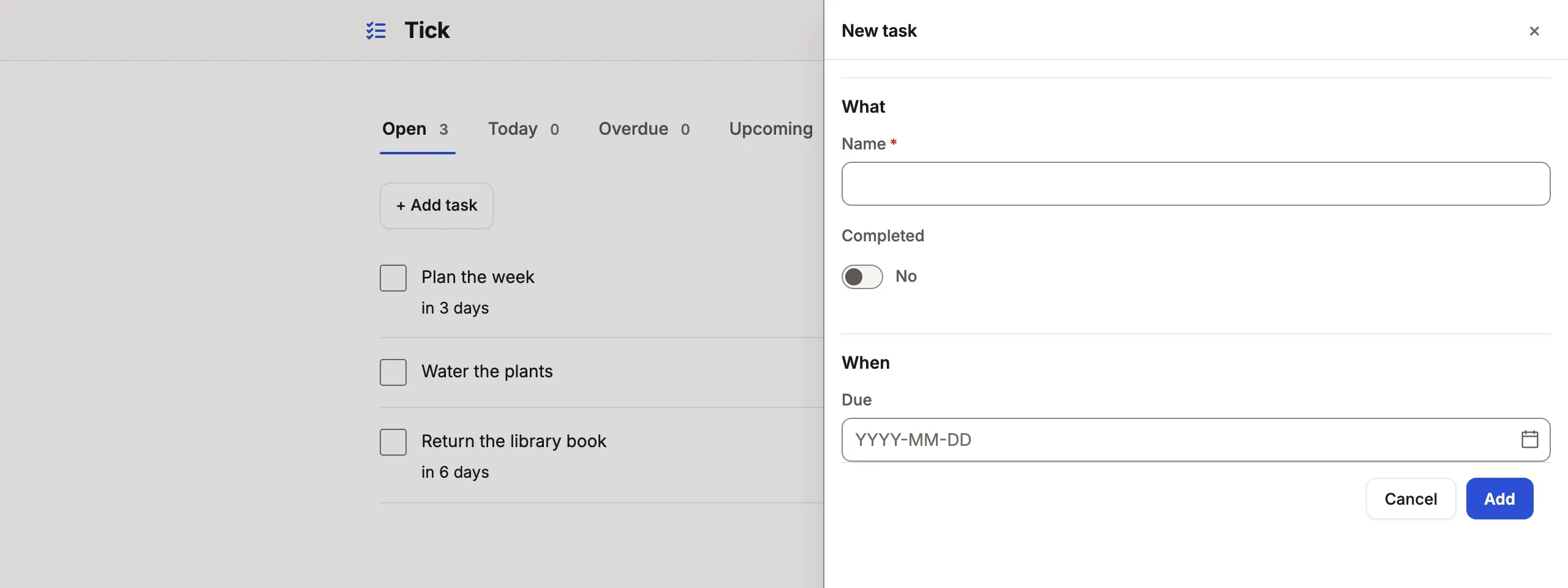
What you’ll see
Section titled “What you’ll see”- New opens the list’s
opensurface (a modal in Tick; a drawer by default for eight fields or fewer, a page for more or forsteps), the inputs in the groups’ order,completedfilled with its default. - Each input drawn from its column: a vocabulary of four words or fewer as radios, a longer one as a listbox, a reference as a typeahead, a date as a picker, prose as several lines.
- An existing record edits with Save and Discard (Tick saves on blur instead,
editing: { save: 'blur' }); a refusal marks the field it names, in the server’s words.
When to use it, and when not
Section titled “When to use it, and when not”- Use a resource
formwhen people create or edit a record’s own columns, and the server’s checks are the table’s columns and itsvalidation. - Use an action instead for a fixed change (Mark lost), and a command when the change is checked against stored state, who acts, or several tables in one transaction.
- Use a command form for a guided or public form (an application, a sign-up) that makes rows through a command.
Options
Section titled “Options”| Key | What it does | Default | Status |
|---|---|---|---|
groups |
{ label, description?, fields }; the inputs are the groups’ fields, in order |
none | Stable |
show |
The inputs, in order, when there are no groups or steps |
every writable column | Stable |
defaults |
Values a new record starts with; today, now and me from tablewalk/app |
none | Stable |
fields |
Per input: label, help, placeholder, multiline, a reference’s where |
the column’s | Stable |
when |
{ salary: 'pay_type = salary' }: an input shown only while the draft matches; a computed column is worked out from the draft |
always | Stable |
steps |
{ label, fields } a step at a time, as a stepper |
none | Stable |
open, description |
'drawer' or 'page'; one sentence under the heading |
by size | Stable |
lines |
Child rows as a grid, inserted with the record in one transaction (lines) | none | Stable |
live |
Computed columns and rollups said as the form is filled in | none | Stable |
text sits beside it too: text: { email: { pattern: '[^@\\s]+@[^@\\s]+\\.[^@\\s]+', message: 'Enter an email address.' } }, with min, max (characters) and pattern (the whole value), said under the field as it is typed and held on every write. On PostgreSQL a varchar(80), a CHECK (char_length(name) >= 2) or a CHECK (code ~ '^[A-Z]{3}$') gives the same rule without it; what the App writes wins, key by key.
validation sits beside form on the resource and holds on every write: { must: 'close_date >= created_on', when?: 'stage = closed_won', message }. A rule may read through one reference, so a line keeps a rule about its parent — { must: 'order_id.status = bench', message: 'Parts go on only while the order is on the bench.' } — judged on the server against the order as the write sees it, and said at order_id. A rule may name a computed column, the record’s own or the referenced record’s ({ must: 'total > 0', message: 'Charge something.' }), and a default may come from one ({ from: 'service_id.list' }): it is worked out of the stored row, unless it reads a rollup, another record or me. delete: true offers Delete, and ui.editing.save: 'blur' saves a field when it loses focus. An App has no Undo: a Save carries the values it showed, so one over a record someone changed since is refused rather than written over theirs. Every key: resources reference.
Common mistakes
Section titled “Common mistakes”showandgroupsboth written is refused → writegroupsalone;showis read from them, as fromsteps.[new-cannot-form]: New is missing for a role → add the column a new row needs to the role’sfields.<table>.write, or make the row with a command.[command-and-edit]on a table a command writes → narrow the role’swritecolumns, or give the table amachine, so a Save cannot undo the command’s work.- A form
whenis mistaken for a permission → it only hides an input; the server accepts what the role may write. Narrow access in roles.
Related
Section titled “Related”- Design a form: grouping, help text, and what a form leaves out.
- Display rules: the words, tones and formats inputs and values share.
- Command forms: guided, public and saved-on-every-step forms.
- Resources reference: every form key, generated from the schema.