Lists
Show a table’s rows the way the work divides, by tab, filter and sort, as a grid, cards, a board, a queue or a calendar.
repairs: listView('Repairs', 'maintenance_request', { icon: 'wrench', roles: [...OFFICE, 'technician'], show: ['title', 'unit_id', 'category', 'priority', 'status', 'assigned_to', 'reported_on', 'scheduled_on'], filters: ['status', 'category', 'priority', 'assigned_to', 'unit_id.property_id'], // … split: { row: { primary: 'title', lines: ['unit_id'], badge: 'status' } }, tabs: [ { segment: 'to_triage', sort: 'reported_on' }, // … { label: 'All', sort: 'reported_on desc' }, ], }),See it in the sample (examples/apps/lintel/views.ts:143) (some tabs left out); each tab names a segment, a condition declared once on the repair resource in resources.ts. Sample Apps says how to run Lintel.
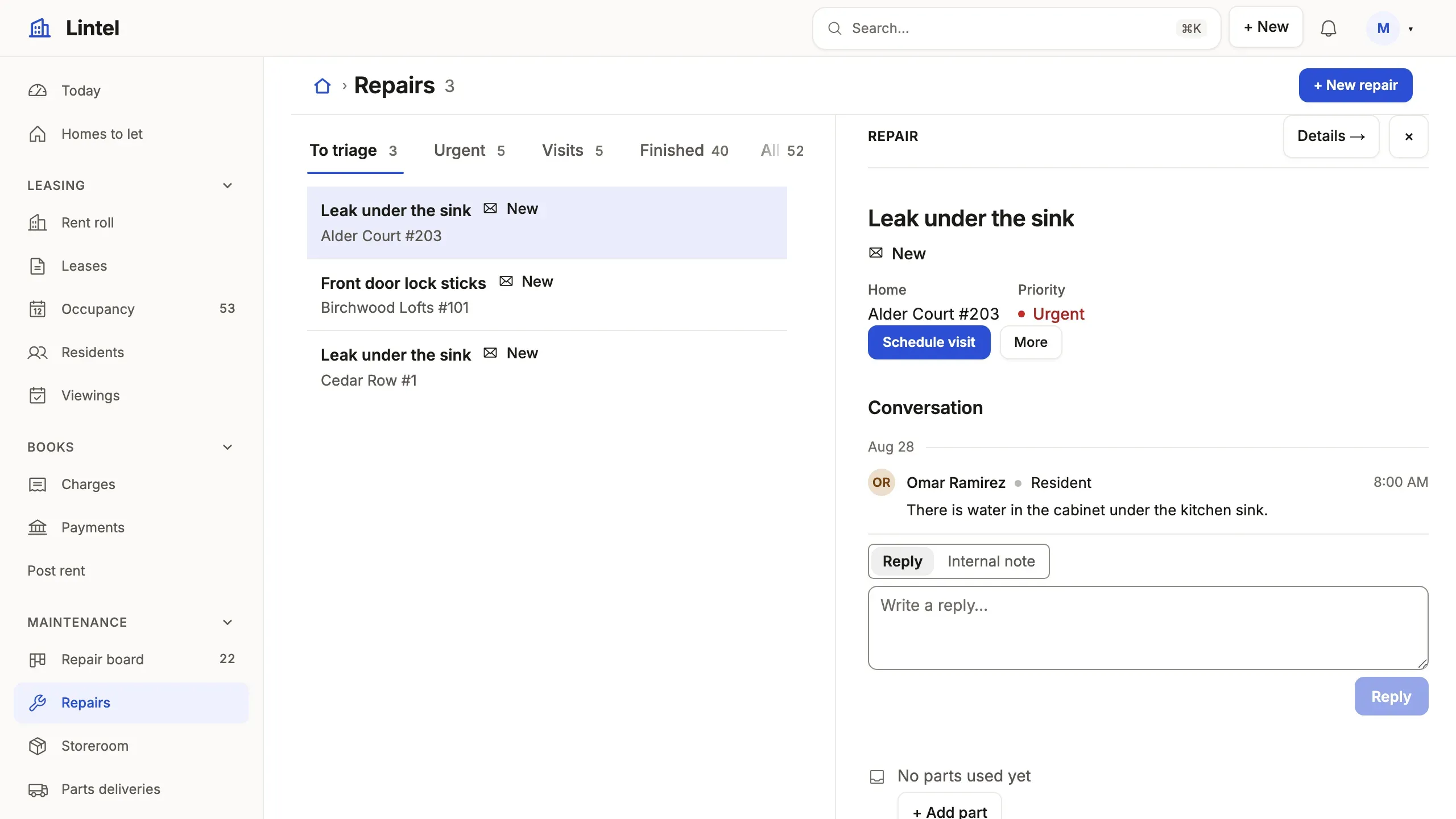
What you’ll see
Section titled “What you’ll see”- A tab per slice of the work, each counted; the open tab is in the address (
/repairs?tab=urgent), and so is every filter and sort (?priority=urgent&sort=-reported_on). - A bar of filters over the rows (
filterBar: 'rail'turns it into a rail of counted facets, as the public listings do);unit_id.property_idfilters by the building a repair’s home is in. - The repair picked opens beside the list (
split), its conversation drawn whole with its verbs in its head; on the Ledger each row carries its own verbs in a ⋯ instead (rowActions). A column named ineditable, as on the Rent roll, edits in place (Enter or F2).
When to use it, and when not
Section titled “When to use it, and when not”- Use a list when people find, compare and work many records of one table; pick its
presentationfrom Choose a building block: a grid to compare,cardsto look at,boardfor stages,queuefor an inbox,splitto read one after another,calendarfor dates. - Use a record page instead for one record and everything around it, and a dashboard for figures across tables.
- Use a command with
targets: 'many'instead of a bulk action when many records must change in one transaction.
Options
Section titled “Options”| Key | What it does | Default | Status |
|---|---|---|---|
show |
Columns and label paths, 4–7, the name first | the table’s columns | Stable |
tabs |
'segment', { segment, sort? } or { label: 'All', sort? }, the first opens; the conditions are the resource’s segments |
none | Stable |
query |
Standing conditions every tab narrows further | none | Stable |
sort |
'created_on desc', or named orders [{ label, sort }] as a Sort menu |
the key | Stable |
filters, filterBar, suggest |
Filter boxes; filterBar: 'rail' draws counted facets; a path filters by a parent’s column ('account_id.industry_id'), { has: 'opportunity', filter: 'stage' } by the rows that point at the record, counted as records; suggest: { title: ['make', 'model'] } has a text filter offer up to eight values of those columns as the person types, read through their grants |
none; a bar | Stable |
presentation |
queue(), calendar(), cards(), checklist(), customList(); tree('parent_account_id', 'name') folds records under their parent, gantt('starts_on', 'ends_on', 'name', { by: 'kind' }) draws spans between two dates (Preview: gantt may change in any 1.x release); a card may reach one hop through a reference (cards('vehicle_id.title', { image: { about: 'vehicle_id', from: 'vehicle_photo', whose: 'vehicle_id' } })) |
a grid | Stable, gantt Preview |
board |
{ by, primary, … }: lanes of cards by one column; category puts a colored tag on each card, footer: [{ column: 'close_date', icon: 'calendar' }, 'team'] a row of up to four facts under it |
no board | Stable |
split |
{ detail, limit, row }: the list beside the picked record; row: { primary, lines, properties, badge, avatar } says how a row reads, and the view’s shortcuts: { s: 'startWork' } binds single keys to the picked record’s actions (shown beside each verb, off while an input has focus) |
no split | Stable |
editable, totals, rowActions |
Cells edited in place, sums over the whole tab, a row’s own actions | off | Stable |
open, order, import |
'drawer' or 'modal'; a column people drag rows by; Import from CSV |
page; none; off | Stable |
opens |
a reference column: a row opens the record it names, so a list of ticket_watcher opens each ticket; a grid only |
the row | Stable |
A tab’s query is the query language without the table name: status = open and due_on < today, close_date = next 90 days, account_id.rating = hot. With the generated tablewalk-schema.d.ts beside the App, every query string is typed: `amout` is not a column of opportunity is a type error at the string. That needs exactly one App’s schema in the TypeScript project; with none or two, the types stand down and check judges the strings (the limit). Every key: views reference. Each presentation is pictured in the blocks gallery.
Common mistakes
Section titled “Common mistakes”[query-grammar]on a tab that saysstatus = open sort due_on→ move the order to the tab’s ownsort: 'due_on';queryholds conditions.- A column of keys (
owner_idshows 7) → show the label pathowner_id.name, or give the resource arecordLabel. [unknown-column]inshoworfilters→ the catalog lists the table’s columns;tablewalk schema --briefprints them one table to a line.
Related
Section titled “Related”- Design a list: which columns, how many tabs, where the filters go.
- Query language: every operator and date phrase a tab can say.
- Display rules: the tones, words, money and units every cell is drawn with.
- Views reference: every list key, generated from the schema.
- Segments: name a query once and use it as a tab, a metric or a word.