Navigation and the shell
Say where each visitor starts, arrange the menu in groups with icons, and place the menu at the side or along the top.
home: [ { view: 'welcome', signedOut: true }, { view: 'portal', roles: ['resident'] }, // … { view: 'today' }, ], nav: navigation,See it in the sample (examples/apps/lintel/app.ts:152). The menu itself is arrangement only:
export const navigation = [ // … navGroup('leasing', 'Leasing', ['units', 'leases', 'occupancy', 'residents', 'viewings'], { icon: 'key' }), // …] satisfies Navigation;See it in the sample (examples/apps/lintel/navigation.ts:8) (the other entries are single views and the Books and Maintenance groups).
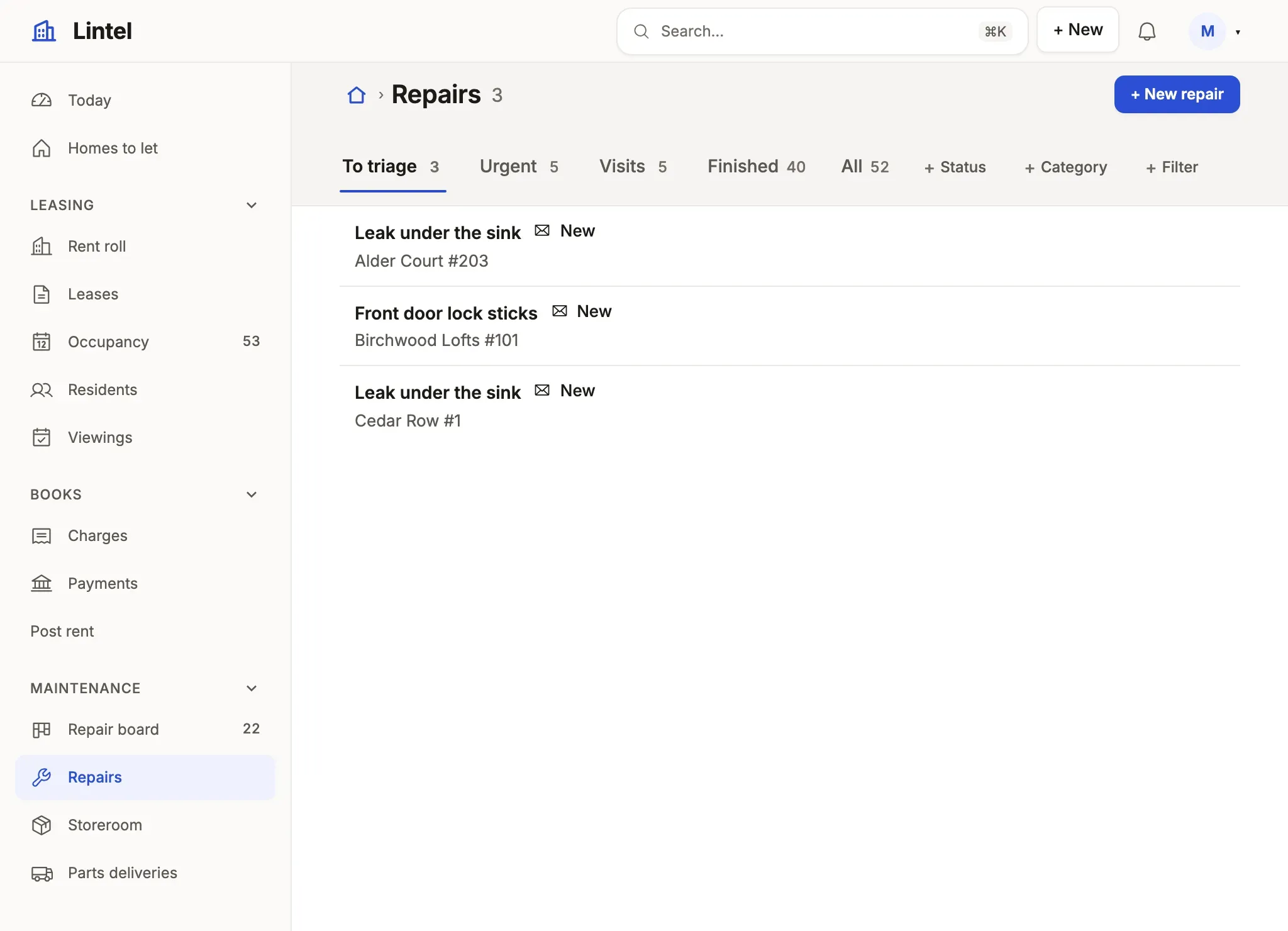
What you’ll see
Section titled “What you’ll see”- The menu in the groups’ order, each entry with its view’s
icon, the current one marked; a group’s heading folds its section, remembered per person; ⌘B or « folds the menu to a rail of icons. - A visitor lands on
home; the breadcrumb’s home and the logo lead back to it, and ⌘K finds any view, in the menu or not. - On a phone the menu folds into the bar, and dialogs fill the screen.
When to use it, and when not
Section titled “When to use it, and when not”- Use
navGrouponce the menu has more than about six entries, in the order the day runs, with{ folded: true }on a section used rarely; fewer, list the view ids. - Use
homeas a list of rules when roles start in different places:[{ view: 'welcome', signedOut: true }, { view: 'portal', roles: ['resident'] }, { view: 'today' }]. - Use access and roles, never the menu, to decide what a reader may open: a view left out of
navis still served at its address.
Options
Section titled “Options”| Key | What it does | Default | Status |
|---|---|---|---|
home |
A view id, or rules ({ view, roles }, { view, signedOut: true }) ending in one with no condition |
required | Stable |
nav |
View ids, { to, label } for a menu-only word (color: 1–8 puts a chart color’s dot beside it), navGroup(id, label, children, { icon, placement, inline, folded }) |
no menu | Stable |
a group’s inline: true |
A top-level group’s items stand in the top bar as links, not behind a menu | a menu | Stable |
ui.logo, a view’s icon |
One of the curated Phosphor names (AppIcon in schema/app.d.ts, all listed in the icons): house, kanban, chart-line, package…; ui.logo may instead be the App’s own picture, { src, dark, mark } (themes) |
none | Stable |
ui.shell.placement, rail |
'side' or 'top'; a folded sidebar’s rail of icons |
'side', a rail |
Stable |
ui.shell.counts, menuSearch |
Live row counts beside lists; a filter box over the menu | off | Stable |
ui.shell.search, breadcrumbs, title |
false leaves each out, for a focused App; an App with no nav has no menu |
shown | Stable |
ui.shell.search: { signedOut: true } |
Offers the header’s search to a signed-out visitor as well; without it a visitor, who has nothing of their own to search, is not shown it | members only | Stable |
ui.shell.width, gutter |
'full', 'wide' or 'narrow'; the side gutter |
'full' |
Stable |
ui.footer |
One footer, drawn by every room and the landing | none | Stable |
ui.shell.new |
A “+ New” button beside the bell listing every way to make something: { view } (a list’s New form, or a signed-in form) or { command } (the signed-in form that runs it), each with an optional label and icon. A reader sees the lines they may use (a table they may add to, a command they are granted), and the palette lists them too; none, no button |
no button | Stable |
ui.shell.new groups |
A long menu groups its lines under headings, written as a nav group is: { label: 'Service desk', children: [{ view: 'tickets' }, ...] } |
none | Stable |
With notify rules on a resource, a bell in the bar counts unread notices and /notifications lists them — in a tenant App, the notices of the customer the person is working in (resources reference). The look is ui.theme: Looks. Every key: ui reference.
Common mistakes
Section titled “Common mistakes”[unknown-view]for a nav entry or ahomerule, or a refusedui.shell.newline → use one of the view ids the message lists; a New line takes a list or a signed-in form, never a dashboard, and acommandexactly one form runs (if two do, name that form by{ view }).- A dashboard that
nav,homeand every embed leave out is refused → put it in the menu, orembedit where it is read. - An icon name outside the list is a type error and a load error → pick one from
AppIcon; the menu takes no image files. homerules with no final unconditional rule are refused → end with{ view: '<id>' }for everyone else.
Related
Section titled “Related”- Design the navigation and shell: how many groups, which placement, and what to leave out.
- Looks: the three built-in looks and your own.
- Public pages: the front door a signed-out visitor’s
homeopens. - ui reference: every shell key, generated from the schema.