Composing a record page
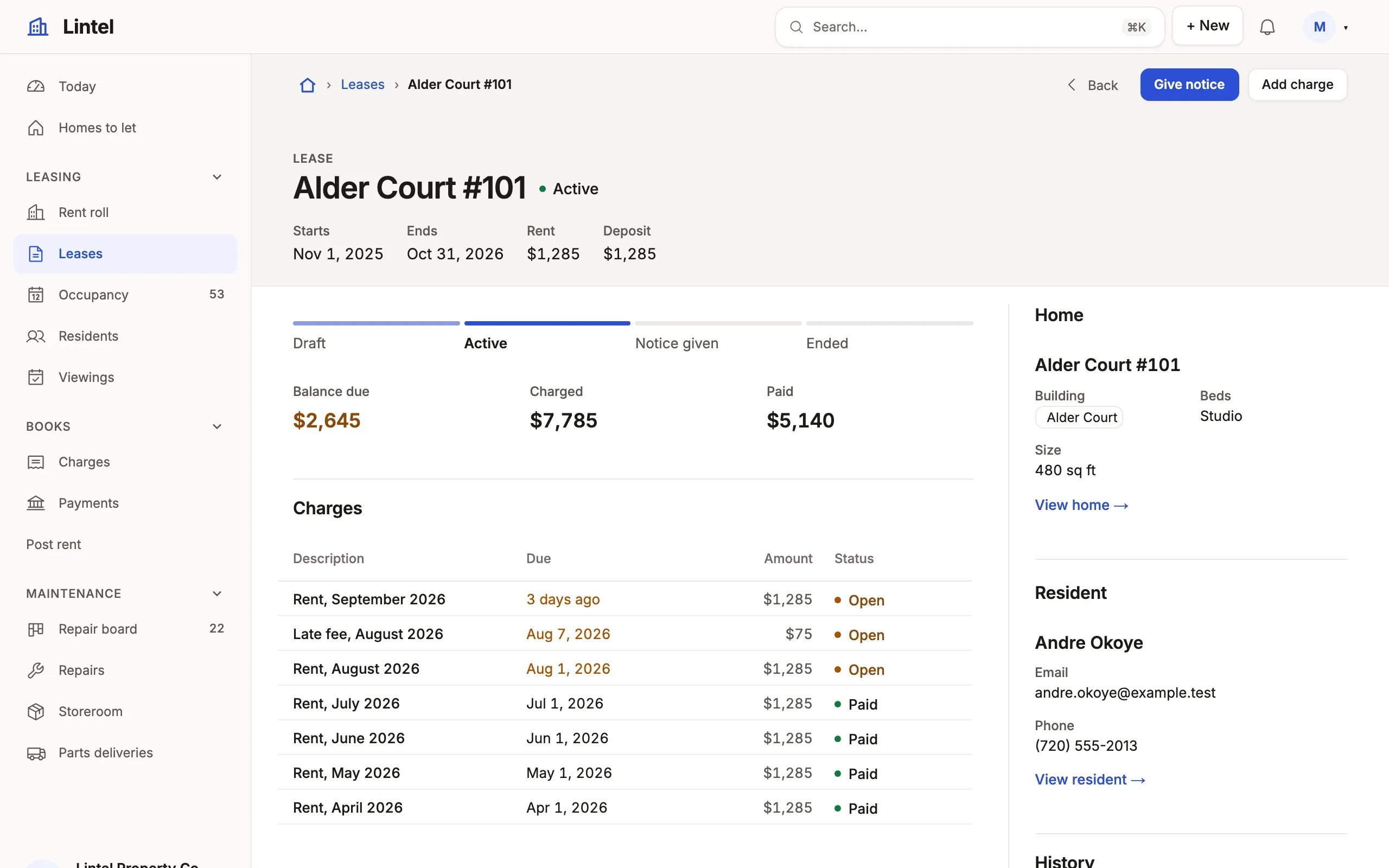
A record page reads as composed when it follows one skeleton: a head that says what the record is, its figures, its children as tabs, and an aside of what is secondary. A record worked by talking, chosen from photos or read has its own (layout, the last four rules), which a page that names none is given from its sections. Lintel’s lease and repair pages are the worked examples.
- Always, start with
header({ status, facts }): the state beside the name and 3–4 facts under it (the parent, a figure, a date) —examples/apps/lintel/pages/lease.ts:10. - When the record has figures, use a
summaryof 3–4 rollups (the firstfields()under the head), not metric cards —examples/apps/lintel/pages/lease.ts:16. - When its state is an ordered pipeline of 3–6 steps, define a
machineon the resource; its states and transitions supply the stepper —examples/apps/lintel/resources.ts:140. - When it has two or more child lists, draw them as tabs with
listTabs: true, each of at most 4 columns, the status last (Lintel’s lease page sayslistTabs: falseand stacks its two) —examples/apps/lintel/pages/lease.ts:31. - When people add children from the record, give the list a
createwhoseprefillcarries the record’s own references —examples/apps/lintel/pages/maintenance_request.ts:30. A role that may read the children but not create them still sees the list, without its New. - When a price came down, give the headline
was: 'was_price'; the older figure is struck through beside it while it is higher. - When the siblings matter, a
relatedlist matched on the parent’s column,{ same: ['property_id'] }(“more homes in this building”) —examples/apps/lintel/pages/unit.ts:37. - When it has a parent, put a
card('Home', 'unit_id', ['property_id', 'bedrooms', 'sqft'])beside the lists, in the aside first where there is one —examples/apps/lintel/pages/lease.ts:27. - When one child row is “the current one” (the next task, the active
lease), use
current()in the aside. It selects one row to display; it does not prove there is only one outstanding row. If people need to see every active child, add a related list or count. If there must be at most one, enforce that invariant in the database (and handle a rejected second write in the App). - When the children have children of their own, read the list as groups:
group: { by: 'lease_id', show: ['unit_id', 'status'], sort: 'start_on desc' }puts a header over each lease (its name, linked to it, its facts) and that lease’s charges under it, a page of groups at a time.limitcounts the rows to a group, and “Show all” opens one in place (up to 50). One level only: what a second level would name is a fact on the header. Tables only, not with a presentation orrowActions; it composes withemptyandtotals(a subtotal under each group) —examples/apps/lintel/pages/resident.ts:17. - Always, beside the lists, a
propertiesrail of the remaining fields (fields()withregion: 'aside'), thenhistory()where the record keeps one (both stand in the aside unasked) —examples/apps/lintel/pages/lease.ts:29. - When a list is usually empty, set
empty: 'hide': left out rather than drawn empty (where the reader may add a row it collapses to a line instead, so the Add stays).empty: 'collapse'says it in one line, and several side by side become one, “No charges, payments or notes yet”, each with its Add;page(…, [...], { empty: 'collapse' })says it for every list that says nothing of its own. InsidelistTabsan empty list is a tab, neither —examples/apps/lintel/pages/unit.ts:29. - When the record is worked by talking (a repair, a ticket), say
layout: 'conversation': its onetimelinelast in the main column, so the composer ends the thread, and its lists inregion: 'aside'—examples/apps/lintel/pages/maintenance_request.ts:37. - When the record is chosen from photos (a home, a vehicle), say
layout: 'showcase': agalleryfirst, its priceheadlinebeside it in the aside, the rest under both at full width; on a phone the price follows the photos —examples/apps/lintel/pages/unit.ts:39. - When the record is read (a task, a policy), say
layout: 'article': one column at a reading measure, with no aside —examples/apps/tick/app.ts:73. - A page that names no layout is drawn in the one its sections make, chosen when the App is read, never from a row: a
galleryfirst is a showcase, atimelineending the main column with no list there a conversation, and the record’s long text with at most 12 facts and nothing else an article;tablewalk check --defaultssays which and why. A written layout refuses a section it cannot place where a chosen one falls back to the record, andlayout: 'record'keeps the record’s own.
The aside is a third of the record, 256px to 320px: nothing in it wider than
two columns. Beside it, four figures and tabs of four short columns fit in the
top menu’s shell (shell: { placement: 'top' }, the scaffold’s); beside the
side menu, at a desk, three figures and four short columns do, so keep the
summary to three or draw the menu on top — tablewalk check --design says which. Title
the rail by what it holds, the record’s noun, never “Details”. The sections
themselves are in Record pages; a person’s page is
Composing an overview page.