Custom components
Draw what no built-in block draws with a React component of your own, fed by checked reads and changing data only through commands.
npm i -D rolldown @types/reactNo shipped example draws a component of its own, so the fragments here are illustrative. An App declares a component by an id and a module path inside its directory, and a section places it:
export const binMap = component('bin-map', { module: './widgets/BinMap.tsx' });
export const warehouseBins = custom('Floor', binMap, {  rows: {    bins: { from: 'bin', whose: 'warehouse_id', show: ['id', 'code', 'zone', 'capacity', 'units', 'active'], sort: 'code', limit: 500 },  },  figures: {    bins: { from: 'bin', whose: 'warehouse_id', measure: 'count' },    units: { from: 'bin', whose: 'warehouse_id', measure: 'sum units' },  },});
The module, widgets/BinMap.tsx, draws with tablewalk/ui.
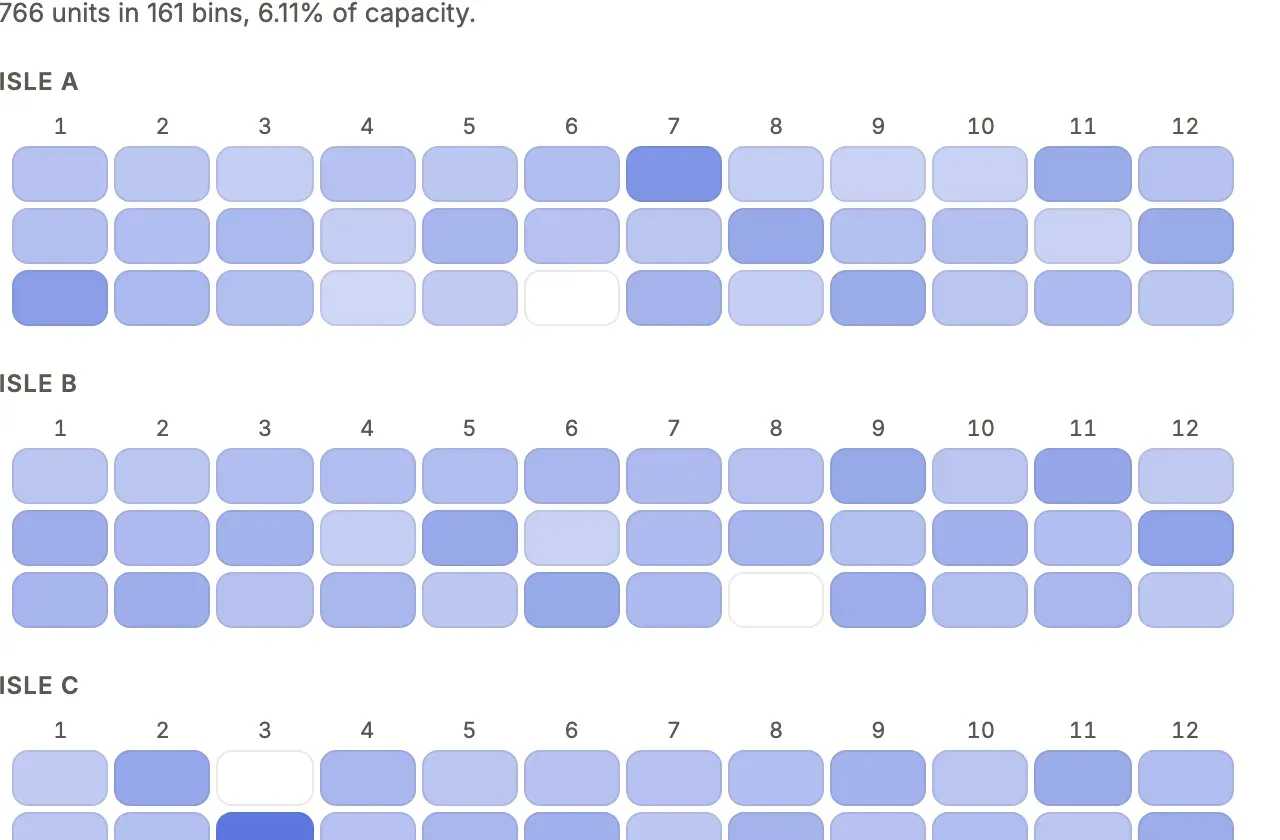
What you’ll see
Section titled “What you’ll see”- The section stands among the page’s built-in ones, with its title, in every look and in dark mode, because it draws with the looks’ tokens.
- Its one read (
bins) arrives as typedrows, and its two figures (bins,units) as exactfigures, all compiled at load and run under the reader’s grants, field projection and row policy; loading and errors are the platform’s to draw. - Edited from source, the module recompiles on save;
tablewalk buildbundles it, pinned to its version.
When to use it, and when not
Section titled “When to use it, and when not”- Use a component only when no section, presentation, chart or display rule draws it, and the need is one App’s: a bin map, a payroll timeline, a forum’s post stream.
- Use Choose a building block first: a bug is fixed in the platform, and a need two Apps share is a platform gap to report, not a component.
- Use a command for anything the component changes: it never writes on its own.
Options
Section titled “Options”| Kind | Declared | Placed | Props type |
|---|---|---|---|
| Section (default) | component(id, { module, props }) |
custom(title, comp, { record, rows, props }) on a page or dashboard |
SectionProps |
| Value | kind: 'value' |
resources.<r>.display.<column> |
ValueProps |
| Input | kind: 'input' |
resources.<r>.inputs, an action’s or a command form’s inputs ('trade.vin' inside a group) |
InputProps |
| List | kind: 'list' |
presentation: customList(comp, { show }) |
ListProps |
| Page | definePage({ path, label, reads, … }) in pages/<path>.page.tsx |
Its own address and nav place; see free-form pages | PageProps |
props are JSON-safe: prop.number({ default, min, max }), prop.text, prop.bool, prop.choice([...]). rows holds up to eight named reads, { from, show, query?, sort?, limit? }, tied to the record by whose on a page or to the window by over on a dashboard. Every key: pages reference.
Write the module
Section titled “Write the module”import { Empty, useFormat, useNavigate, useSectionSize, type SectionProps } from 'tablewalk/ui';import type { Rows } from '../tablewalk-schema.d.ts';import type { warehouseBins } from '../pages/warehouse.ts';
export default function BinMap({ rows }: SectionProps<typeof warehouseBins, Rows, 'warehouse'>) { // rows.bins[0].code is a string, rows.bins[0].units a number}tablewalk/ui is the only tablewalk module a component imports. It gives the kit (Card, Stack, Row, Heading, Button, Value, Tone, Meter, Stat, Columns, Table, Dropdown, Segmented, SplitListDetail, Empty, Icon), extra reads (useRows, useRecord, useBreakdown, useFile), useCommand(cmd) with available, reason, run and open, useNavigate, useComposer (fill the page’s conversation box with a template, fill(text, { mode: 'note' }), never sending it), useViewer, useFormat, useMessage (one of the App’s messages in the reader’s language, useMessage('help.title')), useLook, useToken and useFlags. Table draws rows a component read in the look’s own table: each cell is a Value, so { key: 'amount', label: 'Amount', resource: 'charge', column: 'amount' } is dressed as the App dresses it. Sorting stays yours (sort and onSort say which head is pressed; the rows you pass are the order drawn), and onRowClick makes the first cell the row’s link. An id past 2^53 arrives as a string: draw it with Value, never through Number().
Figures
Section titled “Figures”A figure over all of a table’s rows is an aggregate, not a read: counting rows counts at most the read’s limit. figures holds up to eight named aggregates, { from, measure, by?, whose?, query?, limit? } on a page and { table, measure, by?, query?, over?, limit? } on a dashboard (over ties it to the window as it does a read). measure is count or sum, avg, min or max over a column (sum net). They run on the server as the dashboard’s own metrics and breakdowns do, under the reader’s grants, field projection, row policy and tenant, with no SQL of the component’s own, and they cost one request each (batched where the page allows).
Without by, figures.units is one figure: a count is a number; a sum, avg, min or max is a number, a string (a sum or an id past 2^53 arrives as text, never run it through Number()) or null when no row matched. With by (one column or label path) it is a list of { key, value, label? }, biggest first, limit groups (100 by default, at most 500). Reading is by position, so a figure keeps its shape whatever the server names its columns. In tablewalk/ui/testing, fixtures compute a figure over all the fixture rows, with no limit.
useBreakdown
Section titled “useBreakdown”useBreakdown(resource, { by, measure?, query?, limit? }) is the same machinery asked from the module, for what the section could not name ahead of time (a figure that follows a control). It posts the text table query measure by by to /api/breakdown, so it is read under the reader’s grants, field projection, row policy and tenant like any other read, and a resource the reader may not read is refused. Outside a page (a dashboard section, a list’s or a field’s component) it may name any resource of the App; on a page it may ask only for the resources in the page’s reads (anything else is a type error, a [page-undeclared] problem in check, and refused by the server). Each row is keyed as the server names its columns (status, day(moved_at); the measure as written, sum(net)), so prefer declared figures when the question is known. A breakdown shows at most limit groups (the server’s own ceiling applies), and the platform sends at most 48 breakdowns of one moment in one request. Figures are checked when the App loads (a missing column is a load error); useBreakdown is checked only when it runs.
Typed props
Section titled “Typed props”tablewalk check writes tablewalk-components.d.ts beside tablewalk-schema.d.ts: for each component an App declares, a props type named from its id (sales-summary is SalesSummaryProps) from the declaration: its props with their defaults, each read’s rows, each total’s figure, the record’s fields. A component imports it instead of spelling SectionProps<typeof section, Rows, …> out: import type { BinMapProps } from '../tablewalk-components.d.ts'. A component placed in several places is the union of what each declares. The file is owned by tablewalk, rewritten on check and removed when the App declares no component.
A value component may also export label(value), the word it says each value as. It is called once for every value of the column’s vocabulary (a PostgreSQL enum, a CHECK list, a machine’s states) when the App meets its catalog, and those words reach breakdowns, legends, filter chips, selects and the CSV export; the values you declare win value by value. label must be synchronous, return text of at most 80 characters, and has nothing to call on a free-text column, where check says so. Links keep the stored value.
Style with the tokens (var(--surface), var(--ink), var(--accent), var(--line), var(--radius)…) and classes named c-<component-id>-…; an imported stylesheet (import './Widget.css') is scoped to the component, and typechecks without a declaration of your own: tablewalk/ui declares *.css. Install the optional peers with npm i -D rolldown @types/react. react, react-dom and tablewalk/ui are shared with the page, never bundled.
The tokens are a typed list: tokens and the Token type from tablewalk/ui name every color role (--accent, --accent-ink for the accent as text, --on-accent for words on an accent fill, --status-critical…), the faces (--sans, --mono for data, --heading-font, --code), the corners and the sheets’ type, motion and depth steps, and the space and text scales: --space-1 to --space-8 (2, 4, 8, 12, 16, 24, 32, 48px), --section-seam (40px between sections), --room-inset, --row-h and --text-xs to --text-xl (11 to 20px). Pad and gap with a step, never a literal, and a theme’s rhythm moves your layout with the App’s. tablewalk check warns about a var(--…) that is none of them and that the component does not declare itself, and names the token it was probably meant to be: --negative is --status-critical.
Test with tablewalk/ui/testing in Vitest: renderSection(BinMap, warehouseBins, { data: fixtures<Rows>({ bin: [...] }) }) draws it over typed fixtures and records navigations and commands rather than following them; renderValue, renderList, renderPage and renderInput draw the other kinds, and examples() beside a module doubles as Storybook stories.
Free-form pages
Section titled “Free-form pages”A page drawn whole by your code is one file, pages/<path>.page.tsx, from tablewalk/page:
const page = definePage({ label: 'Pick walk', description: 'Choose a list, then walk it: each line in bin order, confirmed as it goes into the tote.', icon: 'list-checks', nav: { group: 'floor', position: 1 }, reads: ['pick_list', 'order_line', 'warehouse', 'sales_order', 'bin', 'product'], commands: ['pickList'], params: ['list', 'line'], loader: 'pickWalk', component: PickWalk,});// … const pick = page.useCommand('pickList'); const lines = page.useRows('order_line', {// …function PickWalk({ data }: PageProps<'pickWalk'>): ReactNode { const [listId, setList] = page.useParam('list');The general path has one in a sample App, beside a host’s own React app and server. The path is the file’s name (definePage takes none) and the address (/warehouse/pick-walk?list=12&line=3). page.useRows, useRecord, useBreakdown and useFile read only its reads, and page.useCommand runs only its commands; anything else is a type error, a [page-undeclared] problem in check, and refused by the server. A role is offered the page when it is granted every read (roles narrows it; public: true opens it within auth.public); a command it is not granted is refused, and useCommand(…).granted is false, so draw that button only where it is granted. A service role (service: true on a role only jobs and integrations hold) is offered a page only where the page names it, and is never a default role. home may name a page by its path. useAddressState('list') is page.useParam('list') for a module the page draws. authority.lock records each page’s reads, commands and loader. <CommandForm command="releaseOrder" /> is a command’s own dialog behind a button.
A loader runs on the server for the reader and hands the component its data. It is exported from the commands module with defineLoaders and defineLoader (tablewalk/commands); a page that names one it does not export, or one that reads past the page, fails check ([page-loader]):
export const loaders = defineLoaders({ pickWalk: defineLoader({ source, reads: ['pick_list', 'sales_order', 'warehouse'], async load({ db }) { const waiting = await db.pick_list.where({ status: 'to_pick' }).orderBy('released_at').limit(40);// … return { lists: lists.sort((a, b) => (a.shipBy ?? '\uffff').localeCompare(b.shipBy ?? '\uffff')) };Its db is read-only, holds the tables it declares (each one the page reads too) and reads through the reader’s grants, row policy and tenant, on a tenant App’s host as on a single App’s. It has params, viewer, now and signal, ends after its timeout ('5 seconds' by default, at most ten) and returns at most 256 KiB of JSON. tablewalk check types data from what load returns; give the component its own return type (function PickWalk(): ReactNode) so the page’s hooks are typed from the page; without it, TypeScript reports “‘page’ implicitly has type ‘any’”, because the page’s type and its component’s would each wait on the other.
Blocks
Section titled “Blocks”The platform’s sections are components of tablewalk/page, each taking its DSL helper’s words as props and from for its table, one the page reads. Each loads when a page first draws it.
<Grid> <Metric title="Open" from="ticket" query="status = open" width="third" /> <Chart title="Opened" from="ticket" by="month opened_on" width="two-thirds" /> <Panel title="This record" width="half"><RecordCard from="ticket" record={{ id: 7 }} /></Panel> <Tabs param="tab" tabs={[{ key: 'open', label: 'Open', content: <Rows title="Open" from="ticket" query="status = open" /> }]} /></Grid><Rows title from query show sort limit />: a dashboard’srows().<Metric title from query measure compare better format unit target />:metric().<Chart title from by query measure shape format unit … />:chart().<Breakdown title from by query measure limit format unit />:breakdown().format="duration"says a measure of seconds as “10h 2m”, as on a dashboard.<RecordCard from record show />: the record as its page shows it, its name and verbs over its fields.<Timeline from record />: the record page’s timeline.<Tree from parent primary />and<Gantt from start end primary />: a list’stree()andgantt().<Assistant />: the App’s assistant, where it declares one.<Grid>,<Panel title width>and<Tabs tabs param>: the layout, withwidthfull,half,thirdortwo-thirds.
A word a block does not take, or a resource the page does not read, stands as a problem note in the block’s place.
Security
Section titled “Security”A component is deployment code, trusted like app.ts, running in the reader’s browser under the reader’s session. The server stays the boundary: every read and command is authorized per request. The page’s Content-Security-Policy allows only its own origin; ui.connect and ui.images open exactly the origins named, recorded in authority.lock. Importing tablewalk/commands, server code, Node modules or files outside the App is refused at compile. Signed out, a component’s reads are held to auth.public, and it runs no command. A page’s loader cannot write, and is run only for a page the reader may open.
Common mistakes
Section titled “Common mistakes”- “declares custom components, which are compiled with rolldown” at start →
npm i -D rolldown @types/reactin the App’s project. [component-markup]or[component-code-from-text]failscheck(exit 5) → draw React children; neverinnerHTML,evalor a string timer.[component-color],[component-radius]or[component-class]warnings → use a token (var(--accent),var(--radius)) and name classesc-<id>-…, so every look dresses it.- A write from
fetchis refused, oruseCommandsays a record’s command is not granted though the role holds it → run the App’s command withuseCommand, which checks the grant, the record’s revision and the command’swhen, and reach it through one of the resource’sactions; one only the component runs takesheader: false, which keeps it out of the record’s bar, its More menu and every row menu.
Related
Section titled “Related”- Choose a building block: the built-ins to rule out first.
- Component showcase: the kit and example components in every look.
- Commands: what
useCommandruns, and how it refuses. - Looks: the tokens a component draws with.