Dashboards
Put the figures that matter on one page, metrics, charts, breakdowns and waiting work, read over a window the reader picks.
export const today = dashboard( // … metric('Rent collected', 'charge', { // … over: 'due_on', // … better: 'up', // … }), // … { // … windows: ['this month', 'last 30 days', 'last 90 days'], window: 'last 90 days', },);See it in the sample (examples/apps/lintel/dashboards.ts:8) (abridged: the full dashboard adds occupancy, what is overdue, repairs by state, a chart of rent by month, a breakdown by building and two lists of work waiting).
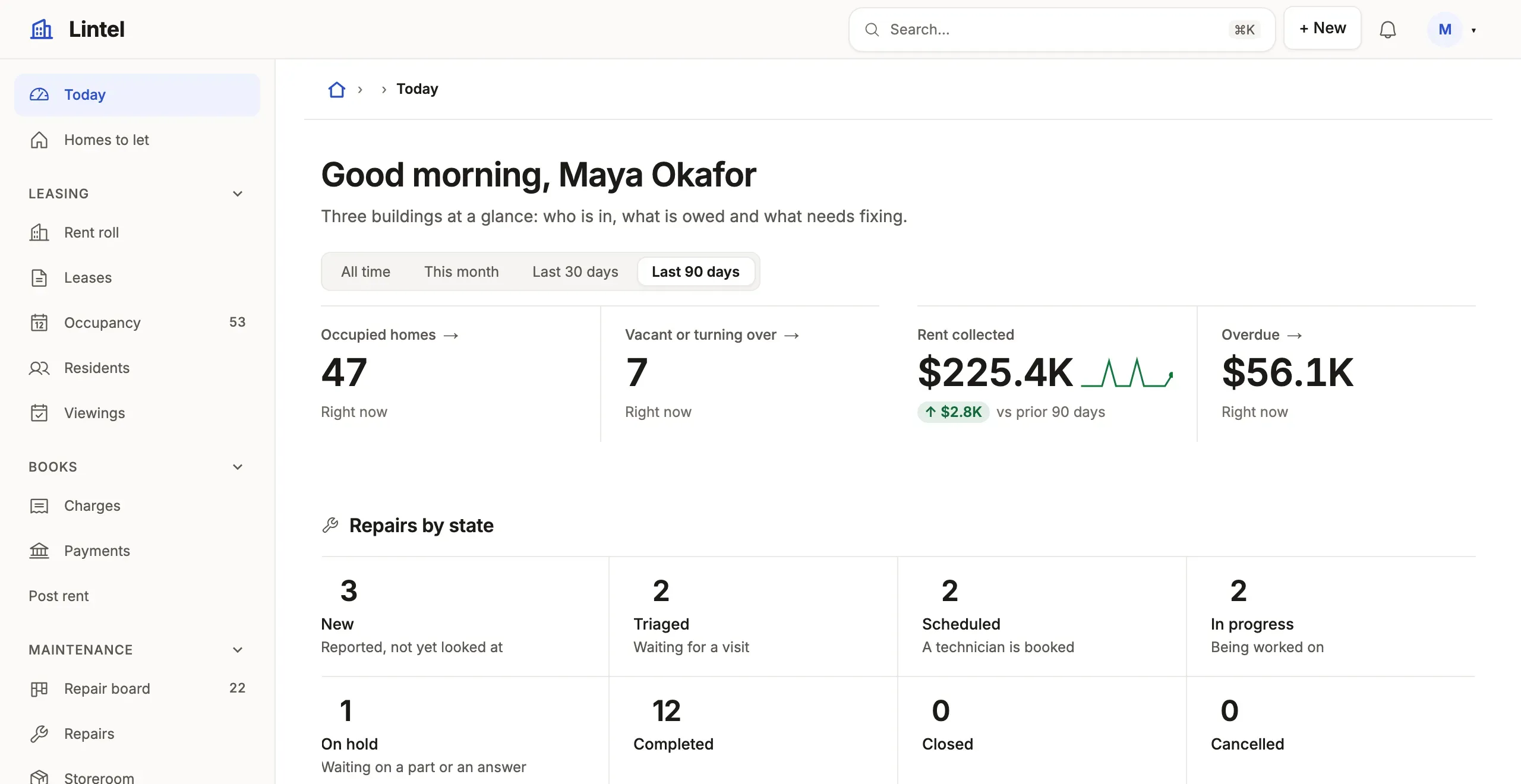
What you’ll see
Section titled “What you’ll see”- A window button (This month, Last 30 days, Last 90 days) beside the filters; the pick is in the address (
?period=last-30-days), and every section withoverfollows it. - The dashboard opening on Last 90 days (
window), and Rent collected as a figure over it, with its change against the 90 days before colored bybetter: 'up'and its trend across the window under it. A metric withovershows both unasked; the trend is days over a month, weeks over a quarter, months over a year. - Sections in rows by
width, metrics in one strip; on a phone the metrics sit two to a row (an odd strip’s first across the row, as its lead), the other sections stack, andasidesections follow the main flow. Withareas(below) the sections stand in the areas you placed them in.
Place sections on a grid
Section titled “Place sections on a grid”Without areas, sections flow into rows by width. When one section has to stand beside a column of two others, name the areas of a grid and put each section in one:
export const today = dashboard( // … breakdown('Homes by building', 'unit', 'property_id', { to: 'units', area: 'building', icon: 'buildings' }), // … { // … areas: [ 'homes homes money money', 'repairs repairs repairs repairs', 'trend trend trend building', 'leases leases viewings viewings', ], },);- One string per row, 1 to 8 rows. Each row has the same number of cells, 1 to 4, and the columns are equal, so
trend trend trend buildingis three quarters and a quarter. A cell is an area’s name (lowercase letters, digits and hyphens) or.for none. - A section says its
area. An area that covers two rows is that tall; several sections in one area stack, in the order you wrote them, and the last takes the height that is left. Metrics in one area are one strip. - Every section names an area, except a
firstRun, which leads the dashboard outside the grid. The area sets the width, so a section with anareatakes nowidth, andareasis not written with anaside. asideand a side area are not the same column. Anasideis context beside a dashboard that flows: a record page’s aside, a landmark of its own, its lists drawn as names with a line and a value, and the main flow keeps its rows bywidthbeside it, neither column waiting on the other’s height. A side area is part of one composed board: its section draws as it would anywhere, and the rows it spans line up with it. Sayasidefor a column of context,areaswhen sections have to line up.- A section left out by
empty: 'hide'leaves its area when it was the area’s only section: its cells go to the area on its left (the right one, for the first), and a row left empty is dropped. That is decided once for each window or filter the reader picks, when every figure has its answer. tablewalk checknames a template that cannot be drawn in words (an area that is not a rectangle, one no section is in, a section in an area the template does not have).tablewalk check --designwarns ofarea-too-narrow: a list or a matrix alone in a one-column area of a template three or four wide.- When the dashboard has less than 13rem for each column (its own width, so the side menu’s narrower room counts), the template becomes one column, the areas in the order they first appear reading left to right, top to bottom. The address does not carry area names.
When to use it, and when not
Section titled “When to use it, and when not”- Use a dashboard for figures across many records: totals, trends, divisions, and short lists of what waits; it makes a good
home. - Use the same
metric,chartandbreakdownon a record page withwhosefor figures about one record. - Use a list with
totalsinstead when people need the rows behind a sum, and behavior analytics for what people do in the App.
Options
Section titled “Options”| Section | What it draws | Status |
|---|---|---|
metric(title, table, opts) |
A figure; compare, better, spark, a target number or goal read from data; to: 'tickets' makes the card open that list on the rows it counted (the figure is its own query within the list’s standing query, never a tab), to: false a card that opens nothing; spark: false draws no trend, windowed or not |
Stable |
chart(title, table, by, opts) |
shape: line, bar, donut or stacked; by a column or month close_date; curve: 'smooth' on a line, total: 'Leads' in a donut’s middle with each slice’s share. scatter (with x: 'count' across and measure up), heatmap (by two keys, such as 'weekday moved_at, hour moved_at'), waterfall and treemap |
Stable |
funnel(title, table, stages, opts) |
Two to eight stages ({ label, query?, optional? }) a row passes in order, counted in one statement: each stage’s rows, its share of the stage before it and the rows it lost; a stage opens the rows that reached it (to, as a chart’s) |
Stable |
breakdown, matrix |
Ranked bars by one key; counts or sums by two. shape: 'steps' draws a breakdown as a row of steps in the vocabulary’s order, each with its count and a short notes line. target: { from: 'quota', by: 'owner_id', measure: 'sum amount', over: 'period' } reads each group’s goal from another table and says each bar as a share of it |
Stable |
rows, board, embed(view) |
Matching rows with a limit (and empty, what it says with none, as a list’s), a board, one of the App’s lists |
Stable |
activity(), note(), firstRun() |
Recent changes, guidance, next steps while the tables are empty; note(text, { variant: 'banner', title, eyebrow, action, image }) is a wide banner with one action |
Stable |
custom(title, component, { rows, props, width }) |
An author’s component, its rows narrowed by the window where they say over, handed the window as period and its region; as a record page places one |
Stable |
find(title, resources, opts) |
One search box over several resources’ records, the hits grouped by resource, each opening its record | Stable |
windows, window, over |
The picker’s choices, in the query grammar (this quarter, last 30 days); the one the dashboard opens on (window: 'last 30 days', else All time; ?period= still wins); the date column a section follows, a computed date among them; windowControl: 'button' shows the picker as one date-range button instead of a segmented row |
Stable |
Every section takes query (conditions, typed against its table), measure (count, sum amount as won, avg, min, max, median, or aggregates joined by + - * /: sum won / sum amount as rate) and width (third, half, two-thirds). A metric with over compares with the period before the window unasked, as compare: 'previous period' says: a picked last 30 days against the 30 days before it (a calendar window, this month, shows no change). compare: 'previous period' without over shifts the query’s one last N days phrase back; with neither, it is refused, since there is no date to window. A metric over a window also draws its trend across it; spark: true draws the last twelve months while no window stands. A chart groups by day, week, month, quarter or year, or lets the window choose: chart('Signups', 'account', 'auto created_at', { over: 'created_at' }) is days over a month, weeks over a quarter, months over a year, and steps up again where the data is sparse; the chart says the unit it chose (“by week”), and a median follows the window alone. A week is said by its first day (“Oct 5”): Monday, or the first day of the App’s ui.locale (Sunday in en-US). refresh: '30 seconds' re-reads it. Every key: views reference.
A metric’s data target that counts the same measure over the same table, with no condition the metric does not also hold, is the whole the figure is a share of: metric('Approved', 'application', { query: 'status = approved', target: { measure: 'count' } }) says “118 of 159 (74%)” instead of “74% of 159 target”, and the whole follows the metric’s window and picks so both count one cohort. A target that cannot be shown to be a subset stays a goal.
A section with nothing to draw is left out with empty: 'hide' (any section but a metric); a rows section may instead say what it means with guidance. empty: 'collapse' is a record page’s, and empty: false is now 'hide'.
A group of a breakdown, chart or matrix, and a funnel’s stage, is a link to one of the App’s lists, narrowed to the group: to: 'tickets' names it, to: false keeps the groups text, and without to it is the one list over the table that the reader is served. With none, or several, the groups are text (check says drill-none or drill-ambiguous): an App never opens the database browser from a dashboard. A bucketed by (month close_date) is never a doorway.
Depot’s warehouse floor reads its busy hours from a heat map: chart('Moves by weekday and hour', 'stock_movement', 'weekday moved_at, hour moved_at', { shape: 'heatmap' }).
A portal’s home finds anything the reader may read, from one box: find('Find anything', ['article', 'catalog_item'], { placeholder: 'Search help and the catalog' }). A resource is searched when the reader is served a list of it, by its records’ names, through its search provider where it declares one.
Common mistakes
Section titled “Common mistakes”- A warning that
betterhas nocompare→ give the metricover(a date column), or dropbetter; there is no change for it to color. [not-a-date]onover→ name a date or timestamp column; dates and types says which are.medianrefused on SQLite → it is PostgreSQL’s (percentile_cont); useavg, or run on PostgreSQL.- A section ignores the picker → give it
over: '<date column>'; a section without one stays as its query says.
Related
Section titled “Related”- Blocks gallery: every chart shape and block, pictured in Lumen.
- Design a dashboard: figures first, then how they move and divide, then what waits.
- Query language: the date phrases a window and a query can say.
- Navigation and the shell: making a dashboard the App’s
home. - Views reference: every section key, generated from the schema.